

Python Projects for Beginners to Advanced [With Source Code]
- Python Project Ideas for Beginners
- 1. Email Slicer
- 2. Number to Words
- 3. Google Image downloader
- 4. Contact List
- 5. Monty Hall Simulation Problem
- 6. Image to Sound
- 7. Snake Game
- 8. GIF Creator
- 9. Website blocker
- 10. Binary Search Algorithm
- Python Project Ideas for Intermediate
- 1. Image to Story
- 2. Number Guessing
- 3. Voice Assistant
- 4. Password Generator
- 5. Reddit Bot
- 6. Black Jack
- 7. Recursive Triangle
- 8. Queue
- Python Project Ideas for Advanced Users
- Why are Python Projects Important?
- FAQs
- Additional Resources
Python is an extremely popular programming language. Almost, 8.2M developers all over the globe use Python for their projects which is more than Java now. So, in order to gain expertise in the Python language, it is recommended to start by creating some projects.
In this article, we are going to cover Python Project Ideas for beginners and experts with valid source code.
Python Project Ideas for Beginners
Well, if you’ve just started out learning Python or are in a stage where you really want to get your hands dirty, then follow this section. We have discussed a few Python projects with source codes here for you to delve deep and get expertise:
1. Email Slicer
One of the easiest projects to start with is getting an email ID as input and slicing it into username and domain name.
email = input("Enter Your Email: ").strip()
username = email[:email.index('@')]
domain = email[email.index('@') + 1:]
Input: dev.carol@gmail.com
Username: dev.carol
Domain: gmail.com
2. Number to Words
This Python project can make you spell out the numbers as you may define. This Python code will help you support more than a million inputs along with the non-positive integers like zero, negative integers, or floating numbers.
import num2words as n2w
from tkinter import *

def num_to_words():
    given_num = float(num.get())
    num_in_word = n2w.num2words(given_num)
    display.config(text=str(num_in_word).capitalize())

root = Tk()
root.title("Numbers tdo Words")
root.geometry("650x400")

num = StringVar()

# Adding title
title = Label(root, text="Number to Words converter",
               fg="Blue", font=("Arial", 20, 'bold')).place(x=220, y=10)

# Options
formats_lable = Label(root, text="Formats supported :  ",
               fg="green", font=("Arial", 10, 'bold')).place(x=100, y=70)
pos_format_lable = Label(root, text="1. Positives :  ",
               fg="green", font=("Arial", 10, 'bold')).place(x=200, y=90)
neg_format_lable = Label(root, text="2. Negatives ",
               fg="green", font=("Arial", 10, 'bold')).place(x=200, y=110)
float_format_lable = Label(root, text="3. Zeros  ",
               fg="green", font=("Arial", 10, 'bold')).place(x=200, y=130)
zero_format_lable = Label(root, text="4. Floating points/decimals/fractions  ",
               fg="green", font=("Arial", 10, 'bold')).place(x=200, y=150)

num_entry_lable = Label(root, text="Enter a number :",
               fg="Blue", font=("Arial", 15, 'bold')).place(x=50, y=200)
num_entry = Entry(root,textvariable=num,width=30).place(x=220, y=200)

btn = Button(master=root, text="calculate",fg="green",

font=("Arial", 10, 'bold')
             ,command=num_to_words).place(x=280,y=230)


display = Label(root, text="",fg="black", font=("Arial", 10, 'bold'))
display.place(x=10, y=300)


photo = PhotoImage(file = "Num2Words/number.png")
root.iconphoto(False, photo)

root.mainloop()
3. Google Image downloader
Need a bunch of images for your new project? Then just run this program and download any number of images for a topic. Only ensure that you do not violate copyright issues and give due credit to the owner, if needed.
from setuptools import setup, find_packages
from codecs import open
from os import path

__version__ = '2.8.0'

here = path.abspath(path.dirname(__file__))

# Get the long description from the README file
with open('README.rst', encoding='utf-8') as f:
    long_description = f.read()

# get the dependencies and installs
with open(path.join(here, 'requirements.txt'), encoding='utf-8') as f:
    all_reqs = f.read().split('\n')

install_requires = [x.strip() for x in all_reqs if 'git+' not in x]
dependency_links = [x.strip().replace('git+', '') for x in all_reqs if x.startswith('git+')]

setup(
    name='google_images_download',
    version=__version__,
    description="Python Script to download hundreds of images from 'Google Images'. It is a ready-to-run code! ",
    long_description=long_description,
    url='https://github.com/hardikvasa/google-images-download',
    download_url='https://github.com/hardikvasa/google-images-download/tarball/' + __version__,
    license='MIT',
    classifiers=[
        'Development Status :: 4 - Beta',
        'Intended Audience :: Developers',
        'License :: OSI Approved :: MIT License',
        'Programming Language :: Python :: 2.7',
        'Programming Language :: Python :: 3.3',
        'Programming Language :: Python :: 3.4',
        'Programming Language :: Python :: 3.5',
        'Programming Language :: Python :: 3.6',
    ],
    keywords='google images download save filter color image-search image-dataset image-scrapper image-gallery terminal command-line',
    packages=find_packages(exclude=['docs', 'tests*']),
    include_package_data=True,
    author='Hardik Vasa',
    install_requires=install_requires,
    dependency_links=dependency_links,
    author_email='hnvasa@gmail.com',
    entry_points={
        'console_scripts': [
            'googleimagesdownload = google_images_download.google_images_download:main'
        ]},

)
4. Contact List
As old school as it may sound, creating a contact list, adding contacts along with phone numbers or emails, and editing them, is still prevalent. To create one, you can use the SQLAlchemy library which uses SQLite to store contacts.
from Tkinter import *
from tkMessageBox import *
import sqlite3
import ttk
def insert():
        n=name.get()

        p=phone.get()
        m=mail.get()
        if(n!="" and p!="" and  m!="" ):
                con = sqlite3.connect('data.db')
                c = con.cursor()

                c.execute('CREATE TABLE IF NOT EXISTS contact (name TEXT, phone TEXT, mail TEXT)')

                r=c.execute("INSERT INTO contact(name, phone, mail) VALUES(?,?,?)",(n,p,m))

                con.commit()
                if(r):
                         g=showinfo('Insert', 'Successfully inserted')


else:
showerror("Error ", "Something went worng check once")

con.close()
        else:
             showerror("Invaild Data ", "Some fields are empty check once!!!")


def dele():
    n=name.get()
    if(n!=""):
        con = sqlite3.connect('data.db')
        c = con.cursor()


        r=c.execute("DELETE FROM contact WHERE name=?",(n,))

        con.commit()
        if(r):
             showinfo('Deleted', 'Successfully Deleted')
             n=""
        else:
            showerror("Invaild Data ", "Some error occured check once!!!")

    con.close()
    else:
        showwarning('NO', 'Check filed once!!!!')


def delete():
    top = Toplevel()
    top.title("DELETE DATA")
    l=Label(top,text="Enter the name to delete")
    l.grid(row=0,columnspan=4)
    e=Entry(top,width=30,textvar=name)
    e.grid(row=2,columnspan=2)
    b=Button(top,text="Delete",command=dele)
    b.grid(row=4,columnspan=4)

    top.mainloop()
def add():
    top = Toplevel()
    top.title("ADD DATA")

    lbl_text = Label(top)
    lbl_text.grid(row=0, columnspan=3)
    l=Label(top,text="NAME :-")
    l.grid(row=1)
    l2=Label(top,text="MOBILE :-")
    l2.grid(row=2)
    l3=Label(top,text="E-MAIL :-")
    l3.grid(row=3)
    e=Entry(top,width=30,textvar=name)
    e.grid(row=1,column=1)

    e1=Entry(top,width=30,textvar=phone)
    e1.grid(row=2,column=1)

    e2=Entry(top,width=30,textvar=mail)
    e2.grid(row=3,column=1)
    b=Button(top,text="Submit",command=insert)
    b.grid(row=4,columnspan=2)

    top.mainloop()
def update():
    showinfo('sorry','These feature not avaiible')

root=Tk()
root.title("Contact Application with Sqlite")
root.geometry("700x500")
name=StringVar()
phone=StringVar()
mail=StringVar()
top=""
f=Frame(root,height=50)

f.pack(fill=X,side=TOP)
l=Label(f,text="Contact Application",bg="white",fg="red")
l.pack(fill=X)
f2=Frame(root,height=100,bg="black")
f2.pack(fill=X,side=TOP)
b1=Button(f2, text="DELETE",command=delete).grid(row=1, column=3, sticky=N,padx=80)
b2=Button(f2, text="+ADD",command=add).grid(row=1, column=4, sticky=N,padx=50)
b3=Button(f2, text="UPDATE",command=update).grid(row=1, column=5, sticky=N,padx=100)
f3=Frame(root,height=200,bg="blue")
f3.pack(fill=X)

tree =ttk.Treeview(f3)


tree["columns"]=("one","two","three")
tree.column("#0", width=210, minwidth=270, stretch=NO)
tree.column("one", width=210, minwidth=200, stretch=NO)
tree.column("two", width=250, minwidth=230,stretch=NO)

tree.heading("#0",text="Name",anchor=W)
tree.heading("one", text="Mobile Number",anchor=W)
tree.heading("two", text="Mail Id",anchor=W)
con = sqlite3.connect('data.db')
c = con.cursor()
c.execute('CREATE TABLE IF NOT EXISTS contact (name TEXT, phone TEXT, mail TEXT)')
r=c.execute("SELECT * FROM contact")
for row in r:
        tree.insert('', 'end',text=row[0],
                         values=(row[1],row[2]))
con.close()

tree.pack(side=TOP,fill=X)
root.resizable(0,0)
root.mainloop()
5. Monty Hall Simulation Problem
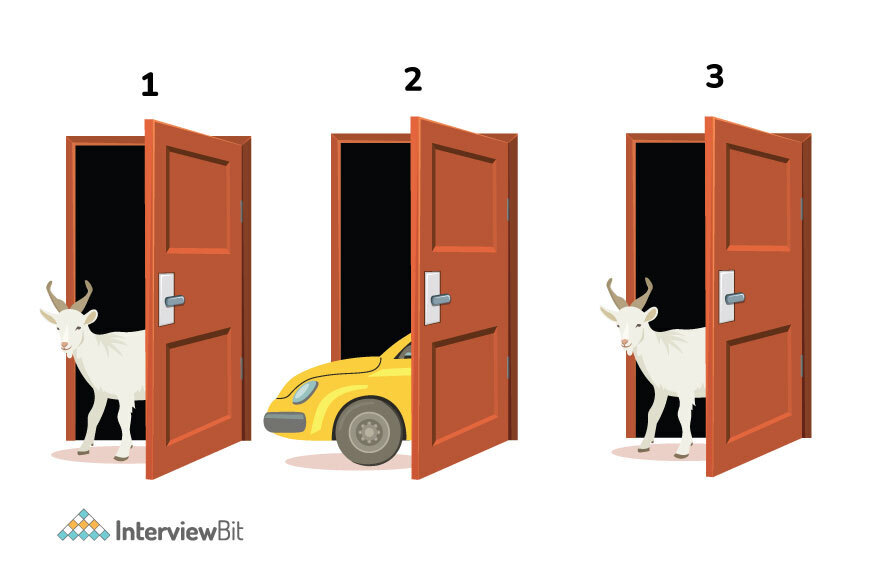
Monty hall problem comes from a famous movie where three doors are used to help you win a car. How? Each door hides something behind it–a car and two goats. Any door can have the car while the remaining two have goats. The probability to find a car is ⅓. Now, if you select Door 1 and the host opens Door 3 to find a goat, your chances just become ⅔. This program will help you solve this problem.
import random
from tkinter import StringVar, Label, Tk, Entry

window = Tk()
window.geometry("400x100")
window.title("Monty hall simulation")
window.resizable(0, 0)

same_choice = StringVar()
switched_choice = StringVar()
same_choice.set(0)
switched_choice.set(0)
no_sample = Entry()
Label(text="Same choice").place(x=80, y=8)
Label(text="Switched choice").place(x=80, y=40)
Label(textvariable=same_choice, font=(15)).place(x=180, y=8)
Label(textvariable=switched_choice, font=(15)).place(x=180, y=40)
no_sample.place(x=100, y=70)


def simulate(event):
    same_choice_result = 0
    switched_choice_result = 0
    samples = int(no_sample.get())
    doors = ["gold", "goat", "bed"]
    for _ in range(samples):
        simulated_doors = doors.copy()
        random.shuffle(simulated_doors)
        first_choice = random.choice(simulated_doors)
        simulated_doors.remove(first_choice)
        opened_door = (
            simulated_doors[0] if simulated_doors[0] != "gold" else simulated_doors[1]
        )
        simulated_doors.remove(opened_door)
        switched_second_choice = simulated_doors[0]
        if first_choice == "gold":
            same_choice_result += 1
            same_choice.set(same_choice_result)
        elif switched_second_choice == "gold":
            switched_choice_result += 1
            switched_choice.set(switched_choice_result)
        else:
            print("That's will never happed")


no_sample.bind("<Return>", simulate)
window.mainloop()
6. Image to Sound
You can create sound from image files now. Imagine displaying an image from the forest with the actual forest sound in the background–Just adds to the drama. For this to run, have an image file and sound file (in .mp3 format) ready.
Install these libraries before running the program:
-> pip install pytesseract
-> pip install gTTS -> pip install pytesseract -> pip install gTTS
from PIL import Image
from gtts import gTTS
from pytesseract import image_to_string


def image_to_sound(path_to_image):
    """
    Function for converting an  image to sound
    """
    try:
        loaded_image = Image.open(path_to_image)
        decoded_text = image_to_string(loaded_image)
        cleaned_text = " ".join(decoded_text.split("\n"))
        print(cleaned_text)
        sound = gTTS(cleaned_text, lang="en")
        sound.save("sound.mp3")
        return True
    except Exception as bug:
        print("The bug thrown while executing the code\n", bug)
        return


if __name__ == "__main__":
    image_to_sound("image.jpg")
    input()
7. Snake Game

With older Nokia phones, we had an old-age addiction with the snake game. But of course, we don’t have it anymore. What if you could write one for yourself using Python?
"""Snake, classic arcade game.

Excercises

1. How do you make the snake faster or slower?
2. How can you make the snake go around the edges?
3. How would you move the food?
4. Change the snake to respond to arrow keys.

"""

from turtle import *
from random import randrange
from freegames import square, vector

food = vector(0, 0)
snake = [vector(10, 0)]
aim = vector(0, -10)

def change(x, y):
    "Change snake direction."
    aim.x = x
    aim.y = y

def inside(head):
    "Return True if head inside boundaries."
    return -200 < head.x < 190 and -200 < head.y < 190

def move():
    "Move snake forward one segment."
    head = snake[-1].copy()
    head.move(aim)

    if not inside(head) or head in snake:
        square(head.x, head.y, 9, 'red')
        update()
        return

    snake.append(head)

    if head == food:
        print('Snake:', len(snake))
        food.x = randrange(-15, 15) * 10
        food.y = randrange(-15, 15) * 10
    else:
        snake.pop(0)
 clear()

    for body in snake:
        square(body.x, body.y, 9, 'black')

    square(food.x, food.y, 9, 'green')
    update()
    ontimer(move, 100)

setup(420, 420, 370, 0)
hideturtle()
tracer(False)
listen()
onkey(lambda: change(10, 0), 'Right')
onkey(lambda: change(-10, 0), 'Left')
onkey(lambda: change(0, 10), 'Up')
onkey(lambda: change(0, -10), 'Down')
move()
done()
8. GIF Creator
As famous as the gif market has become over these years now, demand for quality gif is going up. To expand your horizon, if you find a video that might make a good GIF, then just convert that video into a gif using this Python Project.
from moviepy.editor import *

from moviepy.editor import *
clip = (VideoFileClip("Gif-Creator/video.webm").subclip((2.25),(6.25))
        .resize(0.3))
clip.write_gif("output.gif")
9. Website blocker

Aren’t we all tired of random pop-ups during site surfing? So, we can create website blockers for restraining pushy ads by creating this Python project.
Remember, when you code this, you can add the sites you need to block by editing sites_to_block, change the host, or edit the time when you need to block the sites.
Source Code:
import time
from datetime import datetime as dt

sites_to_block = [
    "www.facebook.com",
    "facebook.com",
    "www.youtube.com",
    "youtube.com",
    "www.gmail.com",
    "gmail.com",
]

Linux_host = "/etc/hosts"
Window_host = r"C:\Windows\System32\drivers\etc\hosts"
default_hoster = Linux_host
redirect = "127.0.0.1"


def block_websites(start_hour, end_hour):
    while True:
        if (
            dt(dt.now().year, dt.now().month, dt.now().day, start_hour)
            < dt.now()
            < dt(dt.now().year, dt.now().month, dt.now().day, end_hour)
        ):
            print("Do the work ....")
            with open(default_hoster, "r+") as hostfile:
                hosts = hostfile.read()
                for site in sites_to_block:
                    if site not in hosts:
                        hostfile.write(redirect + " " + site + "\n")
        else:
            with open(default_hoster, "r+") as hostfile:
                hosts = hostfile.readlines()
                hostfile.seek(0)
                for host in hosts:
                    if not any(site in host for site in sites_to_block):
                        hostfile.write(host)
                hostfile.truncate()
            print("Good Time")
        time.sleep(3)


if __name__ == "__main__":
    block_websites(9, 21)
10. Binary Search Algorithm
As the binary term explains, the system will take any input starting from 0 to any range that you specify and display a range of numbers with a difference of two.
def binary_search(a_list, item):
   """Performs iterative binary search to find the position of an integer in a given, sorted, list.
   a_list -- sorted list of integers
   item -- integer you are searching for the position of
   """
   first = 0
   last = len(a_list) - 1
   while first <= last:
       i = (first + last) / 2
       if a_list[i] == item:
           return ' found at position '.format(item=item, i=i)
       elif a_list[i] > item:
           last = i - 1
       elif a_list[i] < item:
           first = i + 1
       else:
           return ' not found in the list'.format(item=item)
// recursive implementation of binary search in Python
def binary_search_recursive(a_list, item):
   """Performs recursive binary search of an integer in a given, sorted, list.
   a_list -- sorted list of integers
   item -- integer you are searching for the position of
   """
   first = 0
   last = len(a_list) - 1
   if len(a_list) == 0:
       return ' was not found in the list'.format(item=item)
   else:
       i = (first + last) // 2
       if item == a_list[i]:
           return ' found'.format(item=item)
       else:
           if a_list[i] < item:
               return binary_search_recursive(a_list[i+1:], item)
           else:
                return binary_search_recursive(a_list[:i], item)
Python Project Ideas for Intermediate
If you have a little expertise with Python projects, you can directly start building these projects. These projects are for intermediate users who have some knowledge and wish to create more.
1. Image to Story
Want to create amazing stories from images? This project will let you produce a sentence after capturing the image. For this to work, download some pre-trained models and style vectors. Run:
wget http://www.cs.toronto.edu/~rkiros/neural_storyteller.zip
Finally, we need the VGG-19 ConvNet parameters. You can obtain them by running:
wget
https://s3.amazonaws.com/lasagne/recipes/pretrained/imagenet/vgg19.pkl
Open config.py and specify the locations of all of the models and style vectors that you downloaded.
For running on CPU, you will need to download the VGG-19 prototxt and model by:
wget
http://www.robots.ox.ac.uk/~vgg/software/very_deep/caffe/VGG_ILSVRC_19_layers.caffemodel
wget
https://gist.githubusercontent.com/ksimonyan/3785162f95cd2d5fee77/raw/bb2b4fe0a9bb0669211cf3d0bc949dfdda173e9e/VGG_ILSVRC_19_layers_deploy.prototxt
Now, to generate a story, open Ipython and run:
import generate
z = generate.load_all()
generate.story(z, './images/ex1.jpg')
2. Number Guessing
A fun project to guess the number after getting a few hints from the computer. So, the system will generate a number from 0 to 200 and ask the user to guess it after a clue. Every time a user gives a wrong answer, another hint pops up to make it easier for them.
import random #bring in the random number
import time
number=random.randint(1, 200) #pick the number between 1 and 200

def intro():
    print("May I ask you for your name?")
    name=input() #asks for the name
    print(name + ", we are going to play a game. I am thinking of a number between 1 and 200")
    time.sleep(.5)
    print("Go ahead. Guess!")

def pick():
    guessesTaken = 0
    while guessesTaken < 6: #if the number of guesses is less than 6
        time.sleep(.25)
        enter=input("Guess: ") #inserts the place to enter guess
        try: #check if a number was entered
            guess = int(enter) #stores the guess as an integer instead of a string

            if guess<=200 and guess>=1: #if they are in range
                guessesTaken=guessesTaken+1 #adds one guess each time the player is wrong
                if guessesTaken<6:
                    if guess<number:
                        print("The guess of the number that you have entered is too low")
                    if guess>number:
                        print("The guess of the number that you have entered is too high")
                    if guess != number:
                        time.sleep(.5)
                        print("Try Again!")
                if guess==number:
                    break #if the guess is right, then we are going to jump out of the while block
            if guess>200 or guess<1: #if they aren't in the range
                print("Silly Goose! That number isn't in the range!")
                time.sleep(.25)
                print("Please enter a number between 1 and 200")

        except: #if a number wasn't entered
            print("I don't think that "+enter+" is a number. Sorry")

    if guess == number:
        guessesTaken = str(guessesTaken)
        print('Good job, ' + name + '! You guessed my number in ' + guessesTaken + ' guesses!')

    if guess != number:
        print('Nope. The number I was thinking of was ' + str(number))

playagain="yes"
while playagain=="yes" or playagain=="y" or playagain=="Yes":
    intro()
    pick()
    print("Do you want to play again?")
    playagain=input()
3. Voice Assistant

Looking at the market majorly, we realise voice assistants are all up to take over our tasks. Siri, Alexa, and OkGoogle are already leading the market. How about you have a personal assistant of your own> Create your own voice assistant using this Python program.
import pyttsx3
import speech_recognition as sr
import wikipedia
import webbrowser
import os

# init pyttsx
engine = pyttsx3.init("sapi5")
voices = engine.getProperty("voices")

engine.setProperty('voice', voices[1].id)  # 1 for female and 0 for male voice


def speak(audio):
    engine.say(audio)
    engine.runAndWait()


def take_command():
    r = sr.Recognizer()
    with sr.Microphone() as source:
        print("Listening...")
        r.pause_threshold = 1
        audio = r.listen(source)
    try:
        print("Recognizing...")
        query = r.recognize_google(audio, language='en-in')
        print("User said:" + query + "\n")
    except Exception as e:
        print(e)
        speak("I didnt understand")
        return "None"
    return query


if __name__ == '__main__':

    speak("Amigo assistance activated ")
    speak("How can i help you")
    while True:
        query = take_command().lower()
        if 'wikipedia' in query:
speak("Searching Wikipedia ...")

            query = query.replace("wikipedia", '')
            results = wikipedia.summary(query, sentences=2)
            speak("According to wikipedia")
            speak(results)
        elif 'are you' in query:
            speak("I am amigo developed by Jaspreet Singh")
        elif 'open youtube' in query:
            speak("opening youtube")
            webbrowser.open("youtube.com")
        elif 'open google' in query:
            speak("opening google")
            webbrowser.open("google.com")
        elif 'open github' in query:
            speak("opening github")
            webbrowser.open("github.com")
        elif 'open stackoverflow' in query:
            speak("opening stackoverflow")
            webbrowser.open("stackoverflow.com")
        elif 'open spotify' in query:
            speak("opening spotify")
            webbrowser.open("spotify.com")
        elif 'open whatsapp' in query:
            speak("opening whatsapp")
            loc = "C:\\Users\\jaspr\\AppData\\Local\\WhatsApp\\WhatsApp.exe"
            os.startfile(loc)
        elif 'play music' in query:
            speak("opening music")
            webbrowser.open("spotify.com")
        elif 'play music' in query:
            speak("opening music")
            webbrowser.open("spotify.com")
        elif 'local disk d' in query:
            speak("opening local disk D")
            webbrowser.open("D://")
        elif 'local disk c' in query:
            speak("opening local disk C")
            webbrowser.open("C://")
        elif 'local disk e' in query:
            speak("opening local disk E")
            webbrowser.open("E://")
        elif 'sleep' in query:
            exit(0)
4. Password Generator
The most difficult part of managing multiple accounts is generating a different strong password for each. A strong password is a mix of alphabets, numbers, and alphanumeric characters. Therefore, the best use of Python could be building a project where you could generate random passwords for any of your accounts.
import random

def generatePassword(pwlength):

    alphabet = "abcdefghijklmnopqrstuvwxyz"

    passwords = []

    for i in pwlength:

        password = ""
        for j in range(i):
            next_letter_index = random.randrange(len(alphabet))
            password = password + alphabet[next_letter_index]

        password = replaceWithNumber(password)
        password = replaceWithUppercaseLetter(password)

        passwords.append(password)

    return passwords


def replaceWithNumber(pword):
    for i in range(random.randrange(1,3)):
        replace_index = random.randrange(len(pword)//2)
        pword = pword[0:replace_index] + str(random.randrange(10)) + pword[replace_index+1:]
        return pword


def replaceWithUppercaseLetter(pword):
    for i in range(random.randrange(1,3)):
        replace_index = random.randrange(len(pword)//2,len(pword))
        pword = pword[0:replace_index] + pword[replace_index].upper() + pword[replace_index+1:]
        return pword

def main():

    numPasswords = int(input("How many passwords do you want to generate? "))

    print("Generating " +str(numPasswords)+" passwords")

    passwordLengths = []

    print("Minimum length of password should be 3")

    for i in range(numPasswords):
        length = int(input("Enter the length of Password #" + str(i+1) + " "))
        if length<3:
            length = 3
        passwordLengths.append(length)


    Password = generatePassword(passwordLengths)

    for i in range(numPasswords):
        print ("Password #"+str(i+1)+" = " + Password[i])


main()
5. Reddit Bot

We all have used Reddit for one purpose or the other. The famous question-answer app can now also have a bot linked to it. The bot will automate comments on the posts based on specified criteria.
- Pick a subreddit to scan
- Designate a specific comment to search for
- Set your bot’s reply
- Create a config.py file with your Reddit account details and Reddit.py file with the bot requirements
- Pre-requisites: Python, Praw, and A reddit account
Config.py
username = "RedditUsername"
password = "password"
client_id = "idGoesHere"
client_secret = "secretGoesHere"
Reddit.py
import praw
import config
import time
import os

def bot_login():
    print "Logging in..."
    r = praw.Reddit(username = config.username,
                password = config.password,
                client_id = config.client_id,
                client_secret = config.client_secret,
                user_agent = "The Reddit Commenter v1.0")
    print "Logged in!"

    return r

def run_bot(r, comments_replied_to):
    print "Searching last 1,000 comments"

    for comment in r.subreddit('test').comments(limit=1000):
        if "sample user comment" in comment.body and comment.id not in comments_replied_to and comment.author != r.user.me():
            print "String with \"sample user comment\" found in comment " + comment.id
            comment.reply("Hey, I like your comment!")
            print "Replied to comment " + comment.id

            comments_replied_to.append(comment.id)

            with open ("comments_replied_to.txt", "a") as f:
                f.write(comment.id + "\n")

    print "Search Completed."

    print comments_replied_to

    print "Sleeping for 10 seconds..."
    #Sleep for 10 seconds...
    time.sleep(10)

def get_saved_comments():

if not os.path.isfile("comments_replied_to.txt"):
        comments_replied_to = []
    else:
        with open("comments_replied_to.txt", "r") as f:
            comments_replied_to = f.read()
            comments_replied_to = comments_replied_to.split("\n")
            comments_replied_to = filter(None, comments_replied_to)

    return comments_replied_to

r = bot_login()
comments_replied_to = get_saved_comments()
print comments_replied_to

while True:
    run_bot(r, comments_replied_to)
6. Black Jack
Creating the most famous card game of the casinos in Python would be a wonderful project. This game is played with a deck of 52 cards where the strategies play at best. Shuffle the cards, announce the buy-in amount, and decide the ranking of the cards. For ex. If Ace is given number 1 or 11. The player who gets the value of cards to 21 wins the game.
#!/Users/Utsav/downloads/udemy python

# For using the same code in either Python 2 or 3
# from __future__ import print_function

# Importing libraries -- used for shuffling cards
import random

# Boolean type to know whether play is in hand
playing = False

# Amount for buy-in
chip_pool = 100
# raw_input('Enter the amount for buy-in: ')
print 'Your buy-in amount is: ',chip_pool

bet = 1

restart_phrase = "Press d to deal the cards again, or press q to quit."

# Hearts, Diamonds, Clubs, Spades
suits = ('H','D','S','C')

# Possible Card Ranks
ranking = ('A','2','3','4','5','6','7','8','9','10','J','Q','K')

# Point Val Dict (Dual existence of Ace is defined later)
card_val = {'A':1, '2':2, '3':3, '4':4, '5':5, '6':6, '7':7, '8':8, '9':9, '10':10, 'J':10, 'Q':10, 'K':10}

# Creating Card Class

class Card:

    def __init__(self, suit, rank):
        self.suit = suit
        self.rank = rank

    def __str__(self):
        return self.suit + self.rank

    def grab_suit(self):
        return self.suit

    def grab_rank(rank):
        return self.rank

    def draw(self):
        print (self.suit + self.rank)

# Creating Hand Class
# Gives dual existence to Ace

class Hand:

    def __init__(self):
        self.cards = []
        self.value = 0

        # Aces can be 1 0r 11 as defined below
        self.ace = False
def __str__(self):
        '''Return a string of current hand composition'''
        hand_comp = ""

        # List Comprehension
        for card in self.cards:
            card_name = card.__str__()
            hand_comp += " " + card_name

        return 'The hand has %s' %hand_comp

    def card_add(self,card):
        '''Add another card to the hand'''
        self.cards.append(card)

        # Checking for Aces
        if card.rank == 'A':
            self.ace = True
        self.value += card_val[card.rank]

    def calc_val(self):
        '''Calculating value of hand, making aces = 1 if they don't bust the hand'''

        if (self.ace == True and self.value < 12):
            return self.value + 10
        else:
            return self.value

    def draw(self, hidden):
        if hidden == True and playing == True:
            # Don't show first hidden card
            starting_card = 1
        else:
            starting_card = 0
        for x in range(starting_card, len(self.cards)):
            self.cards[x].draw()

# Creating Class Deck

class Deck:

    def __init__(self):
        '''Creating a deck in order'''
        self.deck = []
for suit in suits:
            for rank in ranking:
                self.deck.append(Card(suit,rank))

    def shuffle(self):
        '''Shuffles the deck, using python's built-in random library'''
        random.shuffle(self.deck)

    def deal(self):
        '''Grabbing the first item in the deck'''
        single_card = self.deck.pop()
        return single_card

    def __str__(self):
        deck_comp = " "
        for card in self.cards:
            deck_comp += " " + deck_comp.__str__()

        return "The deck has " + deck_comp

# End of Classes

# First Bet

def make_bet():
    '''Ask the player for the bet amount and '''

    global bet
    bet = 0

    print 'What amount of chips would you like to bet? (Please enter whole integer) '

    # While loop to keep asking for the bet
    while bet == 0:
        # Using bet_comp as a checker
        bet_comp = raw_input()
        bet_comp = int(bet_comp)

        # Check to make sure the bet is within the remaining amount of chips left
        if bet_comp >= 1 and bet_comp <= chip_pool:
            bet = bet_comp
        else:
            print "Invalid bet, you only have " +
str(chip_pool) + " remaining"

def deal_cards():
    '''This function deals out cards and sets up round'''

    # Set up all global variables
    global result, playing, deck, player_hand, dealer_hand, chip_pool, bet

    # Creating a deck
    deck = Deck()

    # Shuffle it
    deck.shuffle()

    # Set up the bet
    make_bet()

    # Set up both player and dealer hands
    player_hand = Hand()
    dealer_hand = Hand()

    # Deal out initial cards
    player_hand.card_add(deck.deal())
    player_hand.card_add(deck.deal())

    result = "Hit or Stand? Press h for hit or s for stand: "

    if playing == True:
        print 'Fold, Sorry'
        chip_pool -= bet

    # Set up to know currently playing hand
    playing = True
    game_step()


# Hit Function

def hit():
    '''Implementing the hit button'''

    global playing, chip_pool, deck, player_hand, dealer_hand, result, bet

    # If hand is in play add card

if playing:
        if player_hand.calc_val() <= 21:
            player_hand.card_add(deck.deal())

        print "Player hand is %s" %player_hand

        if player_hand.calc_val() > 21:
            result = 'Busted!' + restart_phrase

            chip_pool -= bet
            playing = False

    else:
        result = "Sorry, can't hit"	+ restart_phrase

    game_step()

# Stand Function

def stand():
    global playing, chip_pool, deck, player_hand, dealer_hand, result, bet

    '''This function plays the dealers hand, since stand was chosen'''

    if playing == False:
        if player_hand.calc_val() > 0:
            result = "Sorry, you can't stand!"

    # Going through all other possible options
    else:

        # Sfot 17 Rule
        while dealer_hand.calc_val() < 17:
            dealer_hand.card_add(deck.deal())

        # Dealer Busts
        if dealer_hand.calc_val() > 21:
            result = 'Dealer busts! You win! ' + restart_phrase

            chip_pool += bet
            playing = False

        # Player has better hand than dealer
elif dealer_hand.calc_val() < player_hand.calc_val():
            result = 'You beat the dealer, you win! ' + restart_phrase
            chip_pool += bet
            playing = False

        # Push
        elif dealer_hand.calc_val == player_hand.calc_val():
            result = 'Tied up, push!' + restart_phrase
            playing = False

        # Dealer beats player
        else:
            result = 'Dealer Wins! ' + restart_phrase
            chip_pool -= bet
            playing = False

    game_step()

# Function to print results and ask user for next step

def game_step():
    '''Function to print game step/status on output'''

    # Display Player Hand
    print ""
    print ('Player Hand is: '),player_hand.draw(hidden = False)

    print ''
    print 'Player hand total is: ' +str(player_hand.calc_val())

    # Display Dealer Hand
    print ''
    print('Dealer Hand is: '), dealer_hand.draw(hidden = True)

    # If game round is over
    if playing == False:
        print " --- for a total of " + str(dealer_hand.calc_val())
        print "Chip Total: " +str(chip_pool)

    # Otherwise, don't know the second card yet
    else:
        print " with another card hidden upside down"

    # Print result of hit or stand
print ''
    print result

    player_input()


# Function to exit the game

def game_exit():
    print 'Thanks for playing!'
    exit()

# Function to read user input

def player_input():
    '''Read user input, lower case it jsuts to be safe'''

    plin = raw_input().lower()

    if plin == 'h':
        hit()
    elif plin == 's':
        stand()
    elif plin == 'd':
        deal_cards()
    elif plin == 'q':
        game_exit()
    else:
        print "Invalid Input. Enter h, s, d, or q: "
        player_input()

# Intro to game

def intro():
    statement = '''Welcome to BlackJack! Get as close to 21 as you can without getting over!
Dealer hits until she reaches 17. Aces count as 1 or 11. Card output goes a letter followed by a number of face notation. '''

    print statement
    print ''

# Playing the Game

'''The following code will initiate the game!
(Note: Need to Run a 11 Cells)'''

# Create a Deck
deck = Deck()

# Shuffle it
deck.shuffle()

# Create player and dealer hands
print ''
player_hand = Hand()
print ''
deal_hand = Hand()

# Print the intro
intro()

# Deal out the cards and start the game!
deal_cards()
7. Recursive Triangle
This program creates a triangle using stars, recursively.
def triangle(n):
    return recursive_triangle(n, n)

def recursive_triangle(x, n):
    # First we must verify that both input values are integers.
    if type(x) != int or type(n) != int:
        return 'error'
    # If x is bigger than n, we will still only print the full triangle, so we can set them equal.
    if x > n:
        x = n
    # If either value is zero, the output should be an empty string because there are no lines or triangle to print.
    if x == 0 or n == 0:
        return ''
    # Let's set some variable names to help us out.
    star_print = n
    line_number = x
    # I'll create an empty string that we can concatenate values to.
    line_print = ''

# The difference value will determine how many shapes are needed to fill the line before the stars are printed.
    difference = star_print - line_number
    # If difference is not zero, we will print that value of spaces before the stars. The star print will be the
    # remainder, also known as line number.
    if difference != 0:
        line_print += ' '*difference
        line_print += '*'*line_number
    # If difference is zero, then we can just fill the line with stars.
    else:
        line_print += '*'*star_print
    # If the line number is greater than one, we can return our string and use the recursive call to run the function
    # again with the line number as one value less.
    if line_number > 1:
        return line_print+'\n'+str(recursive_triangle(line_number-1, star_print))
    # If the line number is exactly one, then we don't need to use the recursive call.
    elif line_number == 1:
        return line_print
8. Queue
Implements queue data structure. A queue is an entity that maintains the data in a linear format and processes it in FIFO order.
class Node:

    def __init__(self, value):
        self.value = value
        self.next = None

    def __str__(self):
        return "Node({})".format(self.value)

    __repr__ = __str__


class Queue:

    def __init__(self):
        self.head=None
        self.tail=None

    def __str__(self):
temp=self.head
        out=[]
        while temp:
            out.append(str(temp.value))
            temp=temp.next
        out=' '.join(out)
        return ('Head:{}\nTail:{}\nQueue:{}'.format(self.head,self.tail,out))

    __repr__=__str__

    def isEmpty(self):
        # This is where my code begins. I will check to see if self.head is none: if it is, the queue must be empty.
        if self.head is None:
            return True
        else:
            # Otherwise, the queue is not empty and we return False.
            return False

    def __len__(self):
        # I'll create a temp value starting at self.head, the "front" of the queue. I'll also set a count variable to 0.
        temp = self.head
        count = 0
        # We'll traverse the list until the temp value is none, meaning we've reached the end of the queue. For each
        # item, we increase our count value by 1.
        while temp is not None:
            count += 1
            temp = temp.next
        # Then we return our count variable.
        return count

    def enqueue(self, value):
        # If the queue is not empty, we need to examine the tail of the queue.
        if self.head is not None:
            # We'll create an instance of class Node at our value and call it new_node.
            new_node = Node(value)
            # I'll set a temp value to the existing tail of the queue.
            temp = self.tail
            # I'll let the value after the temp variable equal our
new node.
            temp.next = new_node
            # Then, I'll reassign self.tail as the new_node.
            self.tail = new_node
        else:
            # If the queue is empty, we still instantiate class Node at our value.
            new_node = Node(value)
            # Because the queue is empty, self.head and self.tail will both equal new_node until new items are enqueued.
            self.head = new_node
            self.tail = new_node

    def dequeue(self):
        # First, we must check if the queue is empty.
        if self.head is not None:
            # Then, we need to check if the queue has only one value.
            if self.head == self.tail:
                # I'll set a variable at self.head, chosen arbitrarily over self.tail since there is only one item.
                item = self.head
                # I'll save the value of my item for returning later.
                return_value = item.value
                # I'm setting both self.head and self.tail to "item.next," which is simply None. When we have dequeued
                # the item variable, these values should both be none.
                self.head = item.next
                self.tail = item.next
                # Then I delete my single item.
                del item
                # We return the value that we saved earlier.
                return return_value
            else:
                # If the queue has at least two values, we only examine self.head. I'll call it an item variable.
                item = self.head
                # I'll save the value of my item for returning later.
                return_value = item.value
                # I'll set the new self.head to the next item in the queue after my item.
                self.head = item.next
                # Then I delete my item.
                del item
                # We return the value that we saved earlier.
                return return_value
        else:
            # If the queue is empty, we cannot dequeue anything.
            return 'Queue is empty'
Python Project Ideas for Advanced Users
These Python projects are for all those developers who wish to explode the market with high-end applications for use.
1. Content Aggregator
Surfing through various websites to collate the best material for content is a tedious task. With this Python Project, searching and collating all the resources and materials in one place, becomes a lot easier.
import urllib, os, requests, datetime, subprocess
// reddit imports
import praw, pprint
// pip install feedparser
import feedparser
// stockexchange
from nsetools import Nse
// Place your CLIENT_ID & CLIENT_SECRET below
reddit = praw.Reddit(client_id='XXXXXXX',
                    client_secret='XXXXXXXXXXX',
                    grant_type_access='client_credentials',
                    user_agent='script/1.0')
// class Reddit:
//    def TopNews(self):
//          Add your favorite NEWS subreddits in the argument as many as you'd like.
//         for submission in reddit.subreddit('News+WorldNews+UpliftingNews+').top(limit=10):
//             top_news = reddit.domain(submission).top('month')
//             print(top_news)
"""
Each class contains functions which further calls
APIs from the neccesary packages and the rest is
self explanatory I suppose
"""
class News:
   def Indian_News(self):
       newsfeed = feedparser.parse(
           "http://feeds.feedburner.com/ndtvnews-india-news"
       )
print("Today's News: ")
       for i in range(0, 20):
           entry = newsfeed.entries[i]
           print(entry.title)
           print(entry.summary)
           print("------News Link--------")
           print(entry.link)
           print("###########################################")
       print('-------------------------------------------------------------------------------------------------------')
class Medium:
   // https://github.com/thepracticaldev/dev.to/issues/28#issuecomment-325544385
   def medium_programming(self):
       feed = feedparser.parse(
           "https://medium.com/feed/tag/programming"
       )
       print("Programming Today: ")
       for i in range(10):
           entry = feed.entries[i]
           print(entry.title)
           print("URL: " + entry.link)
           print("###########################################")
       print('-------------------------------------------------------------------------------------------------------')
   def medium_python(self):
       feed_python = feedparser.parse(
           "https://medium.com/feed/tag/python"
       )
       print("Python Today: ")
       for i in range(10):
           entry = feed_python.entries[i]
           print(entry.title)
           print("URL: " + entry.link)
           print("###########################################")
       print('-------------------------------------------------------------------------------------------------------')
   def medium_developer(self):
       feed_developer = feedparser.parse(
           "https://medium.com/feed/tag/developer"
       )
       print("Developer News Today: ")
       for i in range(5):
           entry = feed_developer.entries[i]
           print(entry.title)
           print("URL: " + entry.link)
           print("###########################################")

print('-------------------------------------------------------------------------------------------------------')
class StockExchange:
   def nse_stock(self):
       nse = Nse()
       print("TOP GAINERS OF YESTERDAY")
       pprint.pprint(nse.get_top_gainers())
       print("###########################################")
       print("TOP LOSERS OF YESTERDAY")
       pprint.pprint(nse.get_top_losers())
       print("###########################################")
       print('-------------------------------------------------------------------------------------------------------')
// objects inititalization
// reddit_object = Reddit()
News_object = News()
Medium_object = Medium()
StockExchange_object = StockExchange()
if __name__ == "__main__":
   // Functions call of each class
   // reddit_object.TopNews()
   News_object.Indian_News()
   Medium_object.medium_python()
   Medium_object.medium_programming()
   Medium_object.medium_developer()
   StockExchange_object.nse_stock()
2. Building Chatbot

Every site that we open nowadays has a chatbot integrated to extract information from the user/visitor in real-time. This way the problem for manually looking out for customers is solved. Now, you can even create chatbots that talk to the user and grab information. This AI provides numerous features like learn, memory, conditional switch, topic-based conversation handling, etc.
Install from Pypi
pip install chatbotAI
Init.py
import re
import random
import requests
import json
from os import path
from .substitution import Substitution
from .spellcheck import SpellChecker
from . import version
from . import mapper
from .constants import FIRST_QUESTIONS, TERMINATES, LANGUAGE_SUPPORT # noqa: F401
try:
from urllib import quote
except ImportError:
from urllib.parse import quote
try:
input_reader = raw_input
except NameError:
input_reader = input
__version__ = version.__version__
DEFAULT_ATTRIBUTE = {"match": None, "pmatch": None, "_quote": False, "substitute": True}
RE_TAG_PARENTHESIS = re.compile(r'{%?|%?}|\[|\]')
RE_OPERATORS = re.compile(r'([\<\>!=]=|[\<\>]|&|\|)')
RE_NAMED_GROUP = re.compile(r'%([a-zA-Z_][a-zA-Z_0-9]*)([^a-zA-Z_0-9]|$)')
RE_NAMED_GROUP_SILENT = re.compile(r'%!([a-zA-Z_][a-zA-Z_0-9]*)([^a-zA-Z_0-9]|$)')
RE_NUMBERED_GROUP = re.compile(r'%[0-9]+')
RE_NUMBERED_GROUP_SILENT = re.compile(r'%![0-9]+')
class MultiFunctionCall:
def __init__(self, func=None):
self.__func__ = {} if func is None else func
@staticmethod
def default_func(session, string):
return string
def call(self, session, string):
s = string.split(":")
if len(s) <= 1:
return string
name = s[0].strip()
s = ":".join(s[1:])
func = self.default_func
try:
func = self.__func__[name]
except KeyError:
s = string
new_string = re.sub(r'([\[\]{}%:])', r"\\\1", s)
return re.sub(r'\\([\[\]{}%:])', r"\1", func(session, new_string))
_function_call = MultiFunctionCall()
def register_call(function_name=None):
def wrap(function):
if type(function).__name__ != 'function':
raise TypeError("function expected found %s" % type(function).__name__)
function_mapper = _function_call.__func__
if name in function_mapper:
raise ValueError("function with same name is already registered")
function_mapper[name] = function
return function
if function_name is None:
return register_call
if type(function_name).__name__ in ('unicode', 'str'):
name = function_name
return wrap
if type(function_name).__name__ != 'function':
raise TypeError("String is expected for function name found {}".format(
type(function_name).__name__))
name = function_name.__name__
return wrap(function_name)
class DummyMatch:
def __init__(self, string):
self.string = string
def group(self, index):
if index == 0:
return self.string
raise IndexError("no such group")
@staticmethod
def groupdict(*arg, **kwargs):
return {}
class Topic:
def __init__(self, topics):
self.topic = {"general": ''}
self.topics = topics
def __setitem__(self, key, value):
value = value.strip()
if value and value[0] == ".":
index = 1
current_topic = self.topic[key].split(".")
while value[index] == ".":
index += 1
current_topic.pop()
current_topic.append(value[index:])
value = ".".join(current_topic)
self.topic[key] = value
def __getitem__(self, key):
topic = self.topic[key]
if topic in self.topics():
return topic
return ''
class Chat(object):
def __init__(self, pairs=(), reflections=None, call=_function_call,
api=None, normalizer=None, default_template=None, language="en", local_path=None):
"""
Initialize the chatbot. Pairs is a list of patterns and responses. Each
pattern is a regular expression matching the user's statement or question,
e.g. r'I like (.*)'. For each such pattern a list of possible responses
is given, e.g. ['Why do you like %1', 'Did you ever dislike %1']. Material
which is matched by parenthesized sections of the patterns (e.g. .*) is mapped to
the numbered positions in the responses, e.g. %1.
:type pairs: list of tuple
:param pairs: The patterns and responses
:type reflections: dict
:param reflections: A mapping between first and second person expressions
:type call: MultiFunctionCall
:param call: A mapping between user defined function and template function call name
:rtype: None
"""
self.__init__handler()
if local_path is None:
self.local_path = path.join(path.dirname(path.abspath(__file__)), "local")
else:
self.local_path = local_path
self.spell_checker = SpellChecker(self.local_path, language)
self.substitution = Substitution(self.local_path, language)
self._re_tags = re.compile(r'^[\s\t]*(if|endif|elif|else|chat|low|up|cap|call|topic)[\s\t]+')
self._re_block_tags = re.compile(
r'{%[\s\t]*((end)?(block|learn|response|client|prev|group))[\s\t]*([^%]*|%(?=[^}]))%}')
if default_template is None:
default_template = path.join(self.local_path, language, "default.template")
default_pairs = self.__process_template_file(default_template)
if type(pairs).__name__ in ('unicode', 'str'):
pairs = self.__process_template_file(pairs)
self._pairs = {'': {"pairs": [], "defaults": []}}
if not isinstance(pairs, dict):
pairs = {'': {"pairs": pairs, "defaults": []}}
elif '' not in pairs:
raise KeyError("Default topic missing")
normalizer = dict(normalizer) if normalizer else self.substitution.normal
self._normalizer = {}
for key in normalizer:
self._normalizer[key.lower()] = normalizer[key]
self._normalizer_regex = self._compile_reflections(normalizer)
self.__process_learn(default_pairs)
self.__process_learn(pairs)
self._reflections = reflections if reflections else self.substitution.reflections
self._regex = self._compile_reflections(self._reflections)
self._memory = mapper.SessionHandler(dict, general={})
self._conversation = mapper.SessionHandler(mapper.Conversation, general=[])
self._attr = mapper.SessionHandler(dict, general=DEFAULT_ATTRIBUTE.copy())
self.call = call
self._topic = Topic(self._pairs.keys)
self._api = self.__process_api(api)
@staticmethod
def __process_api(api):
if api is None:
return {}
if isinstance(api, dict):
return api
if not isinstance(api, str):
raise TypeError("Expected file path or dict for api found %s" % type(api).__name__)
with open(api) as file:
try:
return json.load(file)
except json.decoder.JSONDecodeError as e:
raise SyntaxError("Invalid value for api: %s" % e)
def __init__handler(self):
"""
initialize handlers and operator functionality
"""
self.__action_handlers = {
"chat": self.__chat_handler,
"low": self.__low_handler,
"up": self.__up_handler,
"cap": self.__cap_handler,
"call": self.__call_handler,
"topic": self.__topic_handler,
"map": self.__map_handler,
"eval": self.__eval_handler,
}
self.__conditional_operator = {
"!=": lambda a, b: a != b,
">=": lambda a, b: a >= b,
"<=": lambda a, b: a <= b,
"==": lambda a, b: a == b,
"<": lambda a, b: a < b,
">": lambda a, b: a > b
}
self.__logical_operator = {
'&': lambda a, b: a and b,
'|': lambda a, b: a or b,
'^': lambda a, b: a ^ b
}
def __normalize(self, text):
"""
Substitute words in the string, according to the specified Normal,
e.g. "I'm" -> "I am"
:type text: str
:param text: The string to be normalized
:rtype: str
"""
return self._normalizer_regex.sub(lambda mo: self._normalizer[mo.string[mo.start():mo.end()].lower()], text)
@staticmethod
def __error_message(expected, text, pos, index):
content = text[max(0, pos[index - 1][0]): pos[index][1] + 5].strip()
return "Expected '%s' tag found '%s' in line `%s`" % (expected, pos[index][2], content)
def __response_tags(self, text, pos, index):
next_index = index+1
if pos[next_index][2] != "endresponse":
raise SyntaxError(self.__error_message("endresponse", text, pos, index))
return text[pos[index][1]:pos[next_index][0]].strip(" \t\n")
def __block_tags(self, text, pos, length, index):
within_block = {"learn": {}, "response": [], "client": [], "prev": []}
while pos[index][2] != "endblock":
if pos[index][2] == "learn":
within_block["learn"] = {}
index = self.__group_tags(text, pos, within_block["learn"],
(lambda i: pos[i][2] != "endlearn"), length, index+1)
index -= 1
elif pos[index][2] == "response":
within_block["response"].append(self.__response_tags(text, pos, index))
index += 1
elif pos[index][2] == "client":
index += 1
if pos[index][2] != "endclient":
raise SyntaxError(self.__error_message("endclient", text, pos, index))
within_block["client"].append(text[pos[index-1][1]:pos[index][0]].strip(" \t\n"))
elif pos[index][2] == "prev":
index += 1
if pos[index][2] != "endprev":
raise SyntaxError(self.__error_message("endprev", text, pos, index))
within_block["prev"].append(text[pos[index-1][1]:pos[index][0]].strip(" \t\n"))
else:
content = text[max(0, pos[index-1][0]): pos[index][1]+5].strip()
raise NameError("Invalid Tag '%s': Error in `%s` " % (pos[index][2], content))
index += 1
return index+1, (within_block["client"],
within_block["prev"] if within_block["prev"] else None,
within_block["response"],
within_block["learn"])
def __group_tags(self, text, pos, groups, condition, length, index=0, name=""):
pairs = []
defaults = []
while condition(index):
if pos[index][2] == "block":
p, within = self.__block_tags(text, pos, length, index+1)
pairs.append(within)
index = p
elif pos[index][2] == "response":
defaults.append(self.__response_tags(text, pos, index))
index += 2
elif pos[index][2] == "group":
child_name = (name+"."+pos[index][3].strip()) if name else pos[index][3].strip()
index = self.__group_tags(text, pos, groups,
(lambda i: pos[i][2] != "endgroup"), length, index+1, name=child_name)
else:
raise SyntaxError(self.__error_message('group, block, or response', text, pos, index))
if name in groups:
groups[name]["pairs"].extend(pairs)
groups[name]["defaults"].extend(defaults)
else:
groups[name] = {"pairs": pairs, "defaults": defaults}
return index+1
def __process_template_file(self, file_name):
with open(file_name, encoding='utf-8') as template:
text = template.read()
pos = [(m.start(0), m.end(0), text[m.start(1):m.end(1)], text[m.start(4):m.end(4)])
for m in self._re_block_tags.finditer(text)]
length = len(pos)
groups = {}
self.__group_tags(text, pos, groups, (lambda i: i < length), length)
return groups
def __build_pattern(self, patterns):
if patterns is None:
return
if type(patterns).__name__ in ('unicode', 'str'):
patterns = [patterns]
regexps = []
for pattern in patterns:
try:
regexps.append(re.compile(self.__normalize(pattern), re.IGNORECASE))
except Exception as e:
e.args = (str(e) + " in pattern "+pattern, )
raise e
return regexps
def __process_learn(self, pairs):
for topic in pairs:
if topic not in self._pairs:
self._pairs[topic] = {"pairs": [], "defaults": []}
self._pairs[topic]["defaults"].extend([(i, self._condition(i))
for i in pairs[topic].get("defaults", [])])
for pair in pairs[topic]["pairs"][::-1]:
learn, previous = {}, None
length = len(pair)
if length > 3:
client, previous, responses, learn = pair[:4]
elif length == 3:
if isinstance(pair[1], (tuple, list)):
client, responses, learn = pair
else:
client, previous, responses = pair
elif length == 2 and isinstance(pair[1], (tuple, list)):
client, responses = pair
else:
raise ValueError("Response not specified")
if not isinstance(learn, dict):
raise TypeError("Invalid Type for learn expected dict got '%s'" % type(learn).__name__)
if not client:
raise ValueError("Each block should contain at least 1 client regex")
self._pairs[topic]["pairs"].insert(0, (self.__build_pattern(client),
self.__build_pattern(previous),
tuple((i, self._condition(i)) for i in responses),
learn))
def start_new_session(self, session_id, topic=''):
self._memory[session_id] = {}
self._conversation[session_id] = []
self._attr[session_id] = DEFAULT_ATTRIBUTE.copy()
self._topic[session_id] = topic
@staticmethod
def remove_items(items, to_remove):
for i in to_remove:
try:
items.remove(i)
except ValueError:
pass
def _restructure(self, group, index=None):
if index is None:
to_remove = {}
groups = list(group)
for i in group:
to_remove[i] = set()
for j in group[i]:
to_remove[i].update(set(group[i]).intersection(group[j]))
for i in group:
for j in to_remove[i]:
group[i].remove(j)
try:
groups.remove(j)
except ValueError:
pass
index = list(group)
to_remove = [j for i in list(groups) for j in group[i]]
self.remove_items(groups, to_remove)
else:
groups = list(index)
while index:
i = index.pop()
if isinstance(group[i], list):
group[i] = self._restructure(dict(group), group[i])
self.remove_items(index, group[i])
return {i: group[i] for i in groups}
def _sub_action(self, group, start_end_pair, action):
return {i: {
"action": action[i],
"start": start_end_pair[i][0],
"end": start_end_pair[i][1],
"child": self._sub_action(group[i], start_end_pair, action)
} for i in group}
def _get_within(self, group, index):
def init_group(p):
group[index[p]]["within"] = []
ordered_group.append(group[index[p]])
return p+1
def append_group(position, p):
position, within = self._get_within(group, index[position:])
group[index[p-1]]["within"] += within
return position
i = 0
ordered_group = []
while i < len(index):
if group[index[i]]["action"] == "if":
i = init_group(i)
start_if = True
while start_if:
if i >= len(index):
raise SyntaxError("If not closed in Conditional statement")
if group[index[i]]["action"] == "elif":
i = init_group(i)
elif group[index[i]]["action"] == "else":
pos = i = init_group(i)
start_if = False
while group[index[pos]]["action"] != "endif":
pos = append_group(pos, i)+i
i = init_group(pos)
elif group[index[i]]["action"] == "endif":
i = init_group(i)
start_if = False
else:
pos = append_group(i, i)
for j in range(i, pos):
del group[index[j]]
i += pos
elif group[index[i]]["action"] in
self.__action_handlers.keys():
ordered_group.append(group[index[i]])
i += 1
else:
return i, ordered_group
return i, ordered_group
def _set_within(self, group):
for i in group:
group[i]["child"] = self._set_within(group[i]["child"]) if group[i]["child"] else []
index = list(group)
index.sort(key=lambda x: group[x]["start"])
pos, ordered_group = self._get_within(group, index)
if pos < len(index):
raise SyntaxError("invalid statement")
return ordered_group
def _inherit(self, start_end_pair, action):
group = {}
for i, primary in enumerate(start_end_pair):
group[i] = []
for j, secondary in enumerate(start_end_pair):
if primary[0] < secondary[0] and primary[1] > secondary[1]:
group[i].append(j)
group = self._restructure(group)
group = self._sub_action(group, start_end_pair, action)
return self._set_within(group)
def __action(self, response, pos, index):
end_tag = pos.pop(index)
begin_tag = pos.pop(index-1)
b_n = begin_tag[1]-begin_tag[0]
e_n = end_tag[1]-end_tag[0]
start_char = response[begin_tag[0]]
end_char = response[end_tag[1]-1]
if b_n != e_n or not ((start_char == "{" and end_char == "}") or (start_char == "[" and end_char == "]")):
raise SyntaxError("invalid syntax '%s'" % response)
if b_n == 2:
statement = self._re_tags.findall(response[begin_tag[1]: end_tag[0]])
if not statement:
raise SyntaxError("invalid statement '%s'" % response[begin_tag[1]:end_tag[0]])
action = statement[0]
elif start_char == "{":
action = "map"
else:
action = "eval"
return begin_tag[1], end_tag[0], action
def _condition(self, response):
pos = ((m.start(0), m.end(0)) for m in RE_TAG_PARENTHESIS.finditer(response))
pos = [(start, end) for start, end in pos if (not start) or response[start-1] != "\\"]
start_end_pair = []
actions = []
while pos:
index = 0
for _, ele in pos[1:]:
index += 1
if response[ele-1] in "}]":
break
if not (index and response[pos[index-1][0]] in "{["):
raise SyntaxError("invalid syntax in \"%s\"" % response)
start, end, action = self.__action(response, pos, index)
start_end_pair.append((start, end))
actions.append(action)
return self._inherit(start_end_pair, actions)
@staticmethod
def _compile_reflections(normal):
sorted_reflection = sorted(normal.keys(), key=len, reverse=True)
return re.compile(r"\b({0})\b".format("|".join(map(re.escape, sorted_reflection))), re.IGNORECASE)
def _substitute(self, session, text):
"""
Substitute words in the string, according to the specified reflections,
e.g. "I'm" -> "you are"
:type session: Session
:param session: Session object
:type text: str
:param text: The string to be mapped
:rtype: str
"""
if not session.attr.get("substitute", True):
return text
return self._regex.sub(lambda mo: self._reflections[mo.string[mo.start():mo.end()]], text.lower())
def _check_if(self, session, con):
pos = [(m.start(0), m.end(0), m.group(0)) for m in RE_OPERATORS.finditer(con)]
if not pos:
return con.strip()
res = prev_res = True
symbol = "&"
first = con[0:pos[0][0]].strip()
for j, ele in enumerate(pos):
s, e, o = ele
try:
second = con[e:pos[j+1][0]].strip()
except IndexError:
second = con[e:].strip()
try:
a, b = float(first), float(second)
except (TypeError, ValueError):
a, b = first, second
if o in self.__conditional_operator:
res = self.__conditional_operator[o](a, b) and res
elif symbol in self.__logical_operator:
prev_res, res = self.__logical_operator[symbol](prev_res, res), True
symbol = o
else:
raise SyntaxError("Invalid conditional operator '%s'" % symbol)
first = second
return self.__logical_operator[symbol](prev_res, res)
def __if_handler(self, session, i, condition, response):
start = self.__get_start_pos(condition[i]["start"], response, "if")
end = condition[i]["end"]
check = True
matched_index = None
_quote = session.attr["_quote"]
session.attr["_quote"] = False
substitute = session.attr.get("substitute", True)
session.attr["substitute"] = False
while check:
con = self._check_and_evaluate_condition(session, response, condition[i]["child"],
start, end)
i += 1
if self._check_if(session, con):
matched_index = i-1
while condition[i]["action"] != "endif":
i += 1
check = False
elif condition[i]["action"] == "else":
matched_index = i
while condition[i]["action"] != "endif":
i += 1
check = False
elif condition[i]["action"] == "elif":
start = self.__get_start_pos(condition[i]["start"], response, "elif")
end = condition[i]["end"]
elif condition[i]["action"] == "endif":
check = False
session.attr["_quote"] = _quote
session.attr["substitute"] = substitute
return ((self._check_and_evaluate_condition(session, response,
condition[matched_index]["within"],
condition[matched_index]["end"]+2,
condition[matched_index+1]["start"]-2
) if matched_index is not None else ""), i)
def __handler(self, session, condition, response, action):
return self._check_and_evaluate_condition(
session, response, condition["child"], self.__get_start_pos(condition["start"], response, action),
condition["end"])
def __chat_handler(self, session, condition, response):
substitute = session.attr.get("substitute", True)
session.attr["substitute"] = False
response = self._respond(session, self.__handler(session,
condition, response, "chat"))
session.attr["substitute"] = substitute
return response
def __low_handler(self, session, condition, response):
return self.__handler(session, condition, response, "low").lower()
def __up_handler(self, session, condition, response):
return self.__handler(session, condition, response, "up").upper()
def __cap_handler(self, session, condition, response):
return self.__handler(session, condition, response, "cap").capitalize()
def __call_handler(self, session, condition, response):
substitute = session.attr.get("substitute", True)
session.attr["substitute"] = False
response = self.call.call(session, self.__handler(session, condition, response, "call"))
session.attr["substitute"] = substitute
return response
def __topic_handler(self, session, condition, response):
session.topic = self.__handler(session, condition, response, "topic").strip()
return ""
@staticmethod
def __get_start_pos(start, response, exp):
return start+re.compile(r"([\s\t]*"+exp+r"[\s\t]+)").search(response[start:]).end(1)
def __map_handler(self, session, condition, response):
start = condition["start"]
end = condition["end"]
think = False
if response[start] == "!":
think = True
start += 1
content = self._check_and_evaluate_condition(session, response, condition["child"], start,
end).strip().split(":")
name = content[0]
this_index = 0
for this_index in range(1, len(content)):
if name[-1] == "\\":
name += ":"+content[this_index]
else:
this_index -= 1
break
this_index += 1
name = name.strip().lower()
if this_index < (len(content)):
value = content[this_index]
for this_index in range(this_index+1, len(content)):
if value[-1] == "\\":
value += ":"+content[this_index]
else:
break
session.memory[name] = self._substitute(session, value.strip())
if think:
return ""
return session.memory.get(name, "")
def __eval_handler(self, session, condition, response):
start = condition["start"]
end = condition["end"]
think = False
if response[start] == "!":
think = True
start += 1
_quote = session.attr["_quote"]
session.attr["_quote"] = True
content = self._check_and_evaluate_condition(session, response, condition["child"], start,
end).strip()
session.attr["_quote"] = _quote
values = content.split(",")
names = values[0].split(":")
api_name = names[0]
method_name = ":".join(names[1:])
data = {}
key = None
for i in values[1:]:
pair = i.split(":")
if len(pair) >= 2:
key = pair[0]
data[key] = ":".join(pair[1:])
elif key is not None:
data[key] += ","+pair[0]
else:
raise SyntaxError("invalid syntax '%s'" % response[start:end])
result = self.__api_handler(api_name, method_name, data)
return "" if think else result
def __api_request(self, url, method, **karg):
try:
return requests.__dict__[method.lower().strip()](url, **karg)
except requests.exceptions.MissingSchema:
return self.__api_request("http://"+url, method, **karg)
except requests.exceptions.ConnectionError:
raise RuntimeError("Couldn't connect to server (unreachable). Check your network")
except KeyError:
raise RuntimeError("Invalid method name '%s' in api.json" % method)
def __api_handler(self, api_name, method_name, data={}):
if api_name not in self._api or method_name not in self._api[api_name]:
raise RuntimeError("Invalid method name '%s' for api '%s' ", (method_name, api_name))
api_params = dict(self._api[api_name][method_name])
if "auth" in self._api[api_name]:
try:
api_params["cookies"] = self.__api_request(**self._api[api_name]["auth"]).cookies
except TypeError:
raise ValueError("In api.json 'auth' of '%s' is wrongly configured." % api_name)
param = "params" if self._api[api_name][method_name]["method"].upper().strip() == "GET" else "data"
try:
api_params[param].update(data)
except KeyError:
api_params[param] = data
api_type = "normal"
if "type" in api_params:
api_type = api_params["type"]
del api_params["type"]
api_data_getter = []
if "value_getter" in api_params:
api_data_getter = api_params["value_getter"]
del api_params["value_getter"]
response = self.__api_request(**api_params)
response_text = response.json() if api_type.upper().strip() == "JSON" else response.content
for key in api_data_getter:
response_text = response_text[key]
return response_text
def _quote(self, session, string):
if session.attr["_quote"]:
try:
return quote(string)
except TypeError:
return quote(string.encode("UTF-8"))
return string
def __substitute_from_client_statement(self, session, match, prev_response, silent=False):
"""
Substitute from Client statement into response
"""
prev = 0
if silent:
start_padding = 2
re_numbered_group = RE_NUMBERED_GROUP_SILENT
re_named_group = RE_NAMED_GROUP_SILENT
else:
start_padding = 1
re_numbered_group = RE_NUMBERED_GROUP
re_named_group = RE_NAMED_GROUP
final_response = ""
for m in re_numbered_group.finditer(prev_response):
start = m.start(0)
end = m.end(0)
num = int(prev_response[start+start_padding:end])
final_response += prev_response[prev:start]
try:
final_response += self._quote(session, self._substitute(session, match.group(num)))
except IndexError:
pass
prev = end
named_group = match.groupdict()
prev_response = final_response + prev_response[prev:]
final_response = ""
prev = 0
for m in re_named_group.finditer(prev_response):
start = m.start(1)
end = m.end(1)
final_response += prev_response[prev:start-start_padding]
value = named_group.get(prev_response[start:end], "").strip()
if value:
final_response += self._quote(session, self._substitute(session, value))
prev = end
return final_response + prev_response[prev:]
def _check_and_evaluate_condition(self, session, response, condition=[], start_index=0, end_index=None):
end_index = end_index if end_index is not None else len(response)
if not condition:
final_response = self.__substitute_from_client_statement(
session, session.attr["match"], response[start_index:end_index])
parent_match = session.attr["pmatch"]
if parent_match is None:
return final_response
return self.__substitute_from_client_statement(session, parent_match, final_response,
silent=True)
i = 0
final_response = ""
_quote = session.attr.get("_quote", True)
while i < len(condition):
pos = condition[i]["start"]-(1 if condition[i]["action"] in ("map", "eval") else 2)
final_response += self._check_and_evaluate_condition(session, response[start_index:pos])
try:
session.attr["_quote"] = False
temp_response = self.__action_handlers[condition[i]["action"]](session, condition[i], response)
session.attr["_quote"] = _quote
final_response += self._quote(session, temp_response)
except KeyError:
session.attr["_quote"] = _quote
if condition[i]["action"] == "if":
response_txt, i = self.__if_handler(session, i, condition, response)
final_response += response_txt
start_index = condition[i]["end"]+(1 if condition[i]["action"] in ("map", "eval") else 2)
i += 1
final_response += self._check_and_evaluate_condition(session, response[start_index:end_index])
return final_response
def _wildcards(self, session, response, match, parent_match):
session.attr["match"] = match
session.attr["pmatch"] = parent_match
response, condition = response
return re.sub(r'\\([\[\]{}%:])', r"\1", self._check_and_evaluate_condition(session, response, condition))
def __chose_and_process(self, session, choices, match, parent_match):
resp = random.choice(choices) # pick a random response
resp = self._wildcards(session, resp, match, parent_match) # process wildcards
# fix munged punctuation at the end
if resp[-2:] == '?.':
resp = resp[:-2] + '.'
if resp[-2:] == '??':
resp = resp[:-2] + '?'
return resp
def __intend_selection(self, text, previous_text, current_topic):
for (patterns, parents, response, learn) in self._pairs[current_topic]["pairs"]: # check each pattern
for pattern in patterns:
match = pattern.match(text)
if match:
break
else:
continue
if parents is None:
return match, None, response, learn
for parent in parents:
parent_match = parent.match(previous_text)
if parent_match: # did the pattern match?
return match, parent_match, response, learn
def __response_on_topic(self, session, text, previous_text, text_correction, current_topic):
match = self.__intend_selection(text, previous_text, current_topic) or \
self.__intend_selection(text_correction, previous_text, current_topic)
if match:
match, parent_match, response, learn = match
if learn:
self.__process_learn({
self._wildcards(session, (topic, self._condition(topic)), match, parent_match):
{
'pairs': [self.__substitute_in_learn(session, pair, match, parent_match)
for pair in learn[topic]['pairs']],
'defaults': [self._wildcards(session, (default, self._condition(default)), match, parent_match)
for default in learn[topic]['defaults']]}
for topic in learn
})
return self.__chose_and_process(session, response, match, parent_match)
if self._pairs[current_topic]["defaults"]:
return self.__chose_and_process(session, self._pairs[current_topic]["defaults"], DummyMatch(text), None)
raise ValueError("No match found")
def _respond(self, session, text):
text = self.__normalize(text)
try:
previous_text = self.__normalize(session.conversation.get_bot_message(-1))
except IndexError:
previous_text = ""
text_correction = self.spell_checker.correction(text)
current_topic = session.topic
current_topic_order = current_topic.split(".")
while current_topic_order:
try:
return self.__response_on_topic(session, text, previous_text, text_correction, current_topic)
except ValueError:
pass
current_topic_order.pop()
current_topic = ".".join(current_topic_order)
try:
return self.__response_on_topic(session, text, previous_text, text_correction, current_topic)
except ValueError:
return "Sorry I couldn't find anything relevant"
def __substitute_in_learn(self, session, pair, match, parent_match):
return tuple((self.__substitute_in_learn(session, i, match, parent_match)
if isinstance(i, (tuple, list)) else
(i if isinstance(i, dict) else (
self._wildcards(session, (i, self._condition(i)), match,
parent_match) if i else i))) for i in pair)
@staticmethod
def __get_topic_recursion(topics):
result = {}
for topic in topics:
topic_depth = result
for sub_topic in topic.split("."):
topic_depth = topic_depth.setdefault(sub_topic, {})
try:
del result['']
result = {'': result}
except KeyError:
pass
return result
def save_template(self, filename):
with open(filename, "w") as template:
for topic_name, sub_topic in self.__get_topic_recursion(self._pairs).items():
self.__generate_and_write_template(template, self._pairs, topic_name, sub_topic)
def __generate_and_write_template(self, template, pairs, topic, sub_topics, base_path=None, padding=""):
full_path = (base_path+"."+topic) if base_path else topic
if topic:
template.write(padding + "{% group "+topic+" %}\n")
new_padding = padding + "\t"
else:
new_padding = padding
for topic_name, sub_topic in sub_topics.items():
self.__generate_and_write_template(template, pairs, topic_name, sub_topic, full_path,
padding=new_padding+"\t")
for (patterns, parents, response, learn) in pairs[full_path]["pairs"]:
template.write(new_padding + "{% block %}\n")
if parents is None:
parents = []
for parent in parents:
template.write(new_padding + "\t{% prev %}"+parent.pattern+"{% endprev %}\n")
for pattern in patterns:
template.write(new_padding + "\t{% client %}"+pattern.pattern+"{% endclient %}\n")
for res in response:
template.write(new_padding + "\t{% response %}"+res[0]+"{% response %}\n")
if learn:
template.write(new_padding + "\t{% learn %}\n")
for topic_name, sub_topic in self.__get_topic_recursion(learn).items():
self.__generate_and_write_template(template, learn, topic_name, sub_topic,
padding=new_padding+"\t")
template.write(new_padding + "\t{% endlearn %}\n")
template.write(new_padding + "{% endblock %}\n")
for res in pairs[topic]["defaults"]:
template.write(new_padding + "{% response %}"+res[0]+"{% response %}\n")
if topic:
template.write(padding + "{% endgroup %}\n")
def _say(self, session, message):
session.conversation.append_user_message(message)
response = self._respond(session, message.rstrip("!."))
session.conversation.append_bot_message(response)
return response
def respond(self, message, session_id="general"):
"""
Generate a response to the user input.
:type message: str
:param message: The string to be mapped
:type session_id: str
:param session_id: Current User session when used for multi user scenario
:rtype: str
"""
return self._respond(mapper.Session(self, session_id), message)
def say(self, message, session_id="general"):
"""
say is a messagehandler takes a client message and returns response
:type message: str
:param message: Client message
:type session_id: str
:param session_id: Current User session when used for multi user scenario
:rtype: str
"""
return self._say(mapper.Session(self, session_id), message)
# Hold a conversation with a chat bot
def converse(self, first_question=None, terminate="quit", session_id="general"):
"""
Conversation initiator
:type first_question: str
:param first_question: Start up message
:type terminate: str
:param terminate: Conversation termination command
:type session: str
:param session: Current User session when used for multi user scenario
:rtype: str
"""
session = mapper.Session(self, session_id)
if first_question:
session.conversation.append_bot_message(first_question)
print(first_question)
input_sentence = ""
while input_sentence != terminate:
input_sentence = terminate
try:
input_sentence = input_reader("> ")
except EOFError:
print(input_sentence)
if input_sentence:
print(self._say(session, input_sentence))
def demo(first_question=None, language="en", **kwargs):
if not first_question:
first_question = FIRST_QUESTIONS.get(language, FIRST_QUESTIONS["en"])
terminate = TERMINATES.get(language, TERMINATES["en"])
Chat(language=language, **kwargs).converse(first_question, terminate=terminate)
Constants.py
FIRST_QUESTIONS = {
"en": "Hi, how are you?",
"de": "Hallo, wie geht es dir?",
"pt-br": "Oi como você está?",
"he": "היי מה קורה?",
}
TERMINATES = {
"en": "quit",
"de": "ende",
"pt-br": "sair",
"he": "זהו"
}
LANGUAGE_SUPPORT = ["en", "de", "pt-br","he"]
Mappers.py
class Session:

    def __init__(self, chat, session_id):
        self.__chat = chat
        self.session_id = session_id

    @property
    def conversation(self):
        return self.__chat._conversation[self.session_id]

    @conversation.setter
    def conversation(self, value):
        self.__chat._conversation[self.session_id] = value

    @property
    def memory(self):
        return self.__chat._memory[self.session_id]

    @memory.setter
    def memory(self, value):
        self.__chat._memory[self.session_id] = value

    @property
    def attr(self):
        return self.__chat._attr[self.session_id]

    @attr.setter
    def attr(self, value):
        self.__chat._attr[self.session_id] = value

    @property
    def topic(self):
        return self.__chat._topic[self.session_id]

    @topic.setter
    def topic(self, value):
        self.__chat._topic[self.session_id] = value


class Conversation(list):

    def __init__(self, *args, **kwargs):
        super().__init__(*args, **kwargs)
        self.__bot_message = []
        self.__user_message = []

    def append_bot_message(self, message):
        self.__bot_message.append(message)
        self.append(message)

    def append_user_message(self, message):
        self.__user_message.append(message)
        self.append(message)

    def get_bot_message(self, index):
        return self.__bot_message[index]

    def get_user_message(self, index):
        return self.__user_message[index]


class SessionHandler:

    def __init__(self, _class, **kwargs):
        self._class = _class
        self.__data = {key: _class(value) for key, value in kwargs.items()}

    def __getitem__(self, key):
        return self.__data[key]

    def __setitem__(self, sender_id, val):
        self.__data[sender_id] = self._class(val)

    def update(self, *args, **kwargs):
        data = dict(*args, **kwargs)
        for key, val in data.items():
            self.__data[key] = self._class(val)

    def __delitem__(self, *args, **kwargs):
        return self.__data.__delitem__(*args, **kwargs)

    def __contains__(self, *args, **kwargs):
        return self.__data.__contains__(*args, **kwargs)

    def __iter__(self):
        return self.__data.__iter__()

    def __len__(self):
        return self.__data.__len__()

def __repr__(self, *args, **kwargs):
        return self.__data.__repr__()

    def __sizeof__(self, *args, **kwargs):
        return self.__data.__sizeof__()

    def __str__(self, *args, **kwargs):
        return self.__data.__str__()

    def clear(self):
        return self.__data.clear()

    def copy(self):
        return SessionHandler(self._class, **self.__data)

    def fromkeys(self, *args):
        return self.__data.fromkeys(*args)

    def get(self, *args):
        return self.__data.get(*args)

    def items(self):
        return self.__data.items()

    def keys(self):
        return self.__data.keys()

    def pop(self, *args):
        return self.__data.pop(*args)

    def popitem(self):
        return self.__data.popitem()

    def setdefault(self, *args, **kwargs):
        return self.__data.setdefault(*args, **kwargs)

    def values(self):
        return self.__data.values()
Setup.py
#!/usr/bin/env python

from setuptools import setup

version = __import__('chatbot.version').__version__
LANGUAGE_SUPPORT = __import__('chatbot.constants').LANGUAGE_SUPPORT
package_data = []

with open("README.md", "r") as fh:
    long_description = fh.read()

for language in LANGUAGE_SUPPORT:
    package_data.extend([
        "local/%s/default.template" % language,
        "local/%s/words.txt" % language,
        "local/%s/substitutions.json" % language
    ])
setup(
    name='chatbotAI',
    version=version,
    author="Ahmad Faizal B H",
    author_email="ahmadfaizalbh726@gmail.com",
    url="https://github.com/ahmadfaizalbh/Chatbot",
    description="A chatbot AI engine is a chatbot builder platform that provids both bot intelligence and"
                " chat handler with minimal codding",
    long_description=long_description,
    long_description_content_type="text/markdown",
    packages=['chatbot', 'chatbot.spellcheck', 'chatbot.substitution'],
    license='MIT',
    keywords='chatbot ai engine and chat builder platform',
    platforms=["Windows", "Linux", "Solaris", "Mac OS-X", "Unix"],
    package_dir={
        'chatbot': 'chatbot',
        'chatbot.spellcheck': 'chatbot/spellcheck',
        'chatbot.substitution': 'chatbot/substitution'
    },
    include_package_data=True,
    package_data={"chatbot":  package_data},
    install_requires=[
          'requests',
      ]
)
3. Face Mask Detection
With the current pandemic times, a face mask is highly appreciated wherever we go. But it also becomes tiresome to manually detect people without a mask. This Python Project lets you detect a mask and prompt any error. This can be applied in malls or any public meeting place. For the source code, you can refer to the Github link.
4. Plagiarism Checker
A nightmare for a writer is whether or not the written work falls into plagiarism barriers. Plagiarism tool scans through your work to find an overlap from an existing source posted online.
To avoid any overlap for stealing someone’s work, we tend to put our work through plagiarism checkers. But the tools cost a fortune. So, with this Python project, you can create a plagiarism checker to scour through any writing work. This Python project uses a Natural Language Processing tool along with a search API to prepare a full-fledged usable Plagiarism checker.
Before you begin the code, install the dependencies:
pip install scikit-learn
Also, you need to have a text file in the .txt format for checking plagiarism. When you run the code, it will load the text files and compare the similarities. For example
$-> cd Plagiarism-checker-Python
$ Plagiarism-checker-Python-> python3 app.py
('john.txt', 'juma.txt', 0.5465972177348937)
('fatma.txt', 'john.txt', 0.14806887549598566)
('fatma.txt', 'juma.txt', 0.18643448370323362)
import os
from sklearn.feature_extraction.text import TfidfVectorizer
from sklearn.metrics.pairwise import cosine_similarity

student_files = [doc for doc in os.listdir() if doc.endswith('.txt')]
student_notes = [open(_file, encoding='utf-8').read()
                 for _file in student_files]


def vectorize(Text): return TfidfVectorizer().fit_transform(Text).toarray()
def similarity(doc1, doc2): return cosine_similarity([doc1, doc2])


vectors = vectorize(student_notes)
s_vectors = list(zip(student_files, vectors))
plagiarism_results = set()


def check_plagiarism():
    global s_vectors
    for student_a, text_vector_a in s_vectors:
        new_vectors = s_vectors.copy()
        current_index = new_vectors.index((student_a, text_vector_a))
        del new_vectors[current_index]
        for student_b, text_vector_b in new_vectors:
            sim_score = similarity(text_vector_a, text_vector_b)[0][1]
            student_pair = sorted((student_a, student_b))
            score = (student_pair[0], student_pair[1], sim_score)
            plagiarism_results.add(score)
    return plagiarism_results


for data in check_plagiarism():
    print(data)
5. Music Player
Almost everyone loves to listen to music. Imagine, creating a music player of your own that involves scanning through project files to find music files, browse through various tracks, add music from your favorite artists, or control the volume.
With this Python project, you create a full-fledged music player with an interactive UI to play around with.
import os
import threading
import time
import tkinter.messagebox
from tkinter import *
from tkinter import filedialog

from tkinter import ttk
from ttkthemes import themed_tk as tk

from mutagen.mp3 import MP3
from pygame import mixer

root = tk.ThemedTk()
root.get_themes()                 # Returns a list of all themes that can be set
root.set_theme("radiance")         # Sets an available theme

# Fonts - Arial (corresponds to Helvetica), Courier New (Courier), Comic Sans MS, Fixedsys,
# MS Sans Serif, MS Serif, Symbol, System, Times New Roman (Times), and Verdana
#
# Styles - normal, bold, roman, italic, underline, and overstrike.

statusbar = ttk.Label(root, text="Welcome to Melody", relief=SUNKEN, anchor=W, font='Times 10 italic')
statusbar.pack(side=BOTTOM, fill=X)

# Create the menubar
menubar = Menu(root)
root.config(menu=menubar)

# Create the submenu

subMenu = Menu(menubar, tearoff=0)

playlist = []


# playlist - contains the full path + filename
# playlistbox - contains just the filename
# Fullpath + filename is required to play the music inside play_music load function

def browse_file():
    global filename_path
    filename_path = filedialog.askopenfilename()
    add_to_playlist(filename_path)

    mixer.music.queue(filename_path)


def add_to_playlist(filename):
    filename = os.path.basename(filename)
    index = 0
    playlistbox.insert(index, filename)
    playlist.insert(index, filename_path)
    index += 1


menubar.add_cascade(label="File", menu=subMenu)
subMenu.add_command(label="Open", command=browse_file)
subMenu.add_command(label="Exit", command=root.destroy)


def about_us():
    tkinter.messagebox.showinfo('About Melody', 'This is a music player build using Python Tkinter by @attreyabhatt')


subMenu = Menu(menubar, tearoff=0)
menubar.add_cascade(label="Help", menu=subMenu)
subMenu.add_command(label="About Us", command=about_us)

mixer.init()  # initializing the mixer

root.title("Melody")
root.iconbitmap(r'images/melody.ico')

# Root Window - StatusBar, LeftFrame, RightFrame
# LeftFrame - The listbox (playlist)
# RightFrame - TopFrame,MiddleFrame and the BottomFrame

leftframe = Frame(root)
leftframe.pack(side=LEFT, padx=30, pady=30)

playlistbox = Listbox(leftframe)
playlistbox.pack()

addBtn = ttk.Button(leftframe, text="+ Add", command=browse_file)
addBtn.pack(side=LEFT)


def del_song():
    selected_song = playlistbox.curselection()
    selected_song = int(selected_song[0])
    playlistbox.delete(selected_song)
    playlist.pop(selected_song)


delBtn = ttk.Button(leftframe, text="- Del", command=del_song)
delBtn.pack(side=LEFT)

rightframe = Frame(root)
rightframe.pack(pady=30)

topframe = Frame(rightframe)
topframe.pack()

lengthlabel = ttk.Label(topframe, text='Total Length : --:--')
lengthlabel.pack(pady=5)

currenttimelabel = ttk.Label(topframe, text='Current Time : --:--', relief=GROOVE)
currenttimelabel.pack()


def show_details(play_song):
    file_data = os.path.splitext(play_song)

    if file_data[1] == '.mp3':
        audio = MP3(play_song)
        total_length = audio.info.length
else:
        a = mixer.Sound(play_song)
        total_length = a.get_length()

    # div - total_length/60, mod - total_length % 60
    mins, secs = divmod(total_length, 60)
    mins = round(mins)
    secs = round(secs)
    timeformat = '{:02d}:{:02d}'.format(mins, secs)
    lengthlabel['text'] = "Total Length" + ' - ' + timeformat

    t1 = threading.Thread(target=start_count, args=(total_length,))
    t1.start()


def start_count(t):
    global paused
    # mixer.music.get_busy(): - Returns FALSE when we press the stop button (music stop playing)
    # Continue - Ignores all of the statements below it. We check if music is paused or not.
    current_time = 0
    while current_time <= t and mixer.music.get_busy():
        if paused:
            continue
        else:
            mins, secs = divmod(current_time, 60)
            mins = round(mins)
            secs = round(secs)
            timeformat = '{:02d}:{:02d}'.format(mins, secs)
            currenttimelabel['text'] = "Current Time" + ' - ' + timeformat
            time.sleep(1)
            current_time += 1


def play_music():
    global paused

    if paused:
        mixer.music.unpause()
        statusbar['text'] = "Music Resumed"
        paused = FALSE
    else:
        try:
            stop_music()
            time.sleep(1)
            selected_song = playlistbox.curselection()
            selected_song = int(selected_song[0])
            play_it = playlist[selected_song]
            mixer.music.load(play_it)
mixer.music.play()
            statusbar['text'] = "Playing music" + ' - ' + os.path.basename(play_it)
            show_details(play_it)
        except:
            tkinter.messagebox.showerror('File not found', 'Melody could not find the file. Please check again.')


def stop_music():
    mixer.music.stop()
    statusbar['text'] = "Music Stopped"


paused = FALSE


def pause_music():
    global paused
    paused = TRUE
    mixer.music.pause()
    statusbar['text'] = "Music Paused"


def rewind_music():
    play_music()
    statusbar['text'] = "Music Rewinded"


def set_vol(val):
    volume = float(val) / 100
    mixer.music.set_volume(volume)
    # set_volume of mixer takes value only from 0 to 1. Example - 0, 0.1,0.55,0.54.0.99,1


muted = FALSE


def mute_music():
    global muted
    if muted:  # Unmute the music
        mixer.music.set_volume(0.7)
        volumeBtn.configure(image=volumePhoto)
        scale.set(70)
        muted = FALSE
    else:  # mute the music
        mixer.music.set_volume(0)
        volumeBtn.configure(image=mutePhoto)
        scale.set(0)
        muted = TRUE


middleframe = Frame(rightframe)
middleframe.pack(pady=30, padx=30)

playPhoto = PhotoImage(file='images/play.png')
playBtn = ttk.Button(middleframe, image=playPhoto, command=play_music)
playBtn.grid(row=0, column=0, padx=10)

stopPhoto = PhotoImage(file='images/stop.png')
stopBtn = ttk.Button(middleframe, image=stopPhoto, command=stop_music)
stopBtn.grid(row=0, column=1, padx=10)

pausePhoto = PhotoImage(file='images/pause.png')
pauseBtn = ttk.Button(middleframe, image=pausePhoto, command=pause_music)
pauseBtn.grid(row=0, column=2, padx=10)

# Bottom Frame for volume, rewind, mute etc.

bottomframe = Frame(rightframe)
bottomframe.pack()

rewindPhoto = PhotoImage(file='images/rewind.png')
rewindBtn = ttk.Button(bottomframe, image=rewindPhoto, command=rewind_music)
rewindBtn.grid(row=0, column=0)

mutePhoto = PhotoImage(file='images/mute.png')
volumePhoto = PhotoImage(file='images/volume.png')
volumeBtn = ttk.Button(bottomframe, image=volumePhoto, command=mute_music)
volumeBtn.grid(row=0, column=1)

scale = ttk.Scale(bottomframe, from_=0, to=100, orient=HORIZONTAL, command=set_vol)
scale.set(70)  # implement the default value of scale when music player starts
mixer.music.set_volume(0.7)
scale.grid(row=0, column=2, pady=15, padx=30)


def on_closing():
    stop_music()
    root.destroy()


root.protocol("WM_DELETE_WINDOW", on_closing)
root.mainloop()
Why are Python Projects Important?
The real value of whatever you learn comes with APPLICATION. Application of your learnings and processes. Building Python projects:
- Build confidence: You realize how comfortable you’ve become with the language. This allows you to try on new features without any hesitation.
- Technologies:
- Concepts: Your programming concepts become solid and you tend to write more maintainable codes. With this you learn to create better design patterns, integrate OOPS concerts, and avoid repeating yourself in the codes.
- Product Lifecycle: By building projects yourself, you involve yourself in the nitty-gritty stuff of the entire lifecycle. You get involved with–Planning, managing, and updating the code. Also keeping the clients’ requests on top.
- Broader Scope: By building projects using Python, you not only build daily stuff easily but get access to fields like data science, web development,machine learning, and many more.
- Community Building: You build your own community, create open-source projects, and create a name for yourself.
FAQs
1. Is Python suitable for large projects?
Python is suitable for any kind of project, especially long form projects. To handle a large project, you need loose coupling and high cohesion. A large project essentially needs an orthogonal structure to carry out small sub-projects as well. It’s speed is relatively high to handle all the mathematical functions. And Python can indeed be a great language to handle every such demand, efficiently.
For example, pydev provides auto-completion and debugging support for python with all the other eclipse goodies like svn support.
2. How do you write a project in Python?
For writing a project in Python,
3. What should my first python project be?
Start from any of the beginner level Python projects that are mentioned above. Once you get a handle on Python with those simple projects like creating–MadLibs Generator, Rock-Paper-Scissors, or Website blocker, you can move to creating other projects.
4. Is Python bad for big projects?
Maybe. Python is used to create large projects but not a large monolithic project because it is dynamically typed. In large monolithic projects, it is difficult to keep a track of all the data types. So, it’s better to design the system as smaller components combined together with better functionality and interface.
5. What kind of projects can be done in python?
We have discussed a plethora of Python projects above for every level. Consider using any project.
6. How to make projects in python?
Creating a project on Python is highly dependent on your own interests as an individual. Find your interests and see projects overlapping with those interests. Try creating using those libraries and code structure.
7. How to run a python project?
Python code after coding is converted into bytecode, internally. To convert that code into readable format, we need an interpreter called the Python Virtual Machine:
- A syntax checker runs on the code.
- Code is internally compiled
- The bytecode is interpreted using PVM
- Finally, the output is generated.
The steps involved to run a Python Project are:
- Open a CMD prompt. Press CMD+R (For windows) and press ENTER.
- Navigate to the folder (C:\….) on your local folder and find the .py file.
- And type python filename.py

Posted by: MYPROGRAMMINGWORLD2021
![Python Projects for Beginners to Advanced [With Source Code]](https://lh3.googleusercontent.com/blogger_img_proxy/AEn0k_sJS8tDFhKndMJoOwFIo7Rn899gSw7vDNWilbWiVZjr7eZhdcHZWMsf36B5DSQgLtJHyQaiez7ooHZrFRF2hAowP6p-jxIkOmOsiPqpJUNerbOe41BQvlk-XONmM9OldUYn750v3wIjrj-u-g-TPW6_R_JKXdyUlWf6pw=w72-h72-p-k-no-nu)


- MYPROGRAMMINGWORLD2021
- i am Atul Sharma.Now i am pursuing B.tech in computer science. "Everybody in this country should learn to program a computer because it teaches you how to think"��


- MYPROGRAMMINGWORLD2021
- i am Atul Sharma.Now i am pursuing B.tech in computer science. "Everybody in this country should learn to program a computer because it teaches you how to think"��
0 Comments
if you have any doubts.Please let me know.