

SQL TUTORIAL

Why to Learn SQL?
SQL is Structured Query Language, which is a computer language for storing, manipulating and retrieving data stored in a relational database.
SQL is the standard language for Relational Database System. All the Relational Database Management Systems (RDMS) like MySQL, MS Access, Oracle, Sybase, Informix, Postgres and SQL Server use SQL as their standard database language.
Also, they are using different dialects, such as −
- MS SQL Server using T-SQL,
- Oracle using PL/SQL,
- MS Access version of SQL is called JET SQL (native format) etc.
Applications of SQL
As mentioned before, SQL is one of the most widely used query language over the databases. I'm going to list few of them here:
Allows users to access data in the relational database management systems.
Allows users to describe the data.
Allows users to define the data in a database and manipulate that data.
Allows to embed within other languages using SQL modules, libraries & pre-compilers.
Allows users to create and drop databases and tables.
Allows users to create view, stored procedure, functions in a database.
Allows users to set permissions on tables, procedures and views.
Audience
This SQL tutorial is prepared for beginners to help them understand the basic as well as the advanced concepts related to SQL languages. This tutorial will give you enough understanding on the various components of SQL along with suitable examples.
Prerequisites
Before you start practicing with various types of examples given in this tutorial, I am assuming that you are already aware about what a database is, especially the RDBMS and what is a computer programming language.
SQL - OVERVIEW
SQL is a language to operate databases; it includes database creation, deletion, fetching rows, modifying rows, etc. SQL is an ANSI (American National Standards Institute) standard language, but there are many different versions of the SQL language.
What is SQL?
SQL is Structured Query Language, which is a computer language for storing, manipulating and retrieving data stored in a relational database.
SQL is the standard language for Relational Database System. All the Relational Database Management Systems (RDMS) like MySQL, MS Access, Oracle, Sybase, Informix, Postgres and SQL Server use SQL as their standard database language.
Also, they are using different dialects, such as −
- MS SQL Server using T-SQL,
- Oracle using PL/SQL,
- MS Access version of SQL is called JET SQL (native format) etc.
Why SQL?
SQL is widely popular because it offers the following advantages −
Allows users to access data in the relational database management systems.
Allows users to describe the data.
Allows users to define the data in a database and manipulate that data.
Allows to embed within other languages using SQL modules, libraries & pre-compilers.
Allows users to create and drop databases and tables.
Allows users to create view, stored procedure, functions in a database.
Allows users to set permissions on tables, procedures and views.
A Brief History of SQL
1970 − Dr. Edgar F. "Ted" Codd of IBM is known as the father of relational databases. He described a relational model for databases.
1974 − Structured Query Language appeared.
1978 − IBM worked to develop Codd's ideas and released a product named System/R.
1986 − IBM developed the first prototype of relational database and standardized by ANSI. The first relational database was released by Relational Software which later came to be known as Oracle.
SQL Process
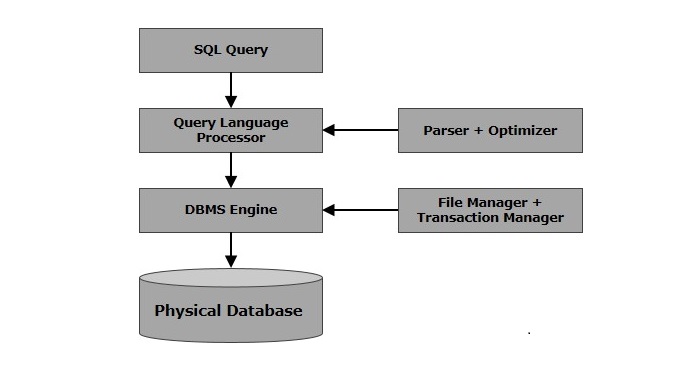
When you are executing an SQL command for any RDBMS, the system determines the best way to carry out your request and SQL engine figures out how to interpret the task.
There are various components included in this process.
These components are −
- Query Dispatcher
- Optimization Engines
- Classic Query Engine
- SQL Query Engine, etc.
A classic query engine handles all the non-SQL queries, but a SQL query engine won't handle logical files.
Following is a simple diagram showing the SQL Architecture −
SQL Commands
The standard SQL commands to interact with relational databases are CREATE, SELECT, INSERT, UPDATE, DELETE and DROP. These commands can be classified into the following groups based on their nature −
DDL - Data Definition Language
| Sr.No. | Command & Description |
|---|---|
| 1 | CREATE Creates a new table, a view of a table, or other object in the database. |
| 2 | ALTER Modifies an existing database object, such as a table. |
| 3 | DROP Deletes an entire table, a view of a table or other objects in the database. |
DML - Data Manipulation Language
| Sr.No. | Command & Description |
|---|---|
| 1 | SELECT Retrieves certain records from one or more tables. |
| 2 | INSERT Creates a record. |
| 3 | UPDATE Modifies records. |
| 4 | DELETE Deletes records. |
DCL - Data Control Language
| Sr.No. | Command & Description | |||||
|---|---|---|---|---|---|---|
| 1 | GRANT Gives a privilege to user. | |||||
| 2 | REVOKE Takes back privileges granted from user. SQL - RDBMS Concepts
| What is RDBMS?RDBMS stands for Relational Database Management System. RDBMS is the basis for SQL, and for all modern database systems like MS SQL Server, IBM DB2, Oracle, MySQL, and Microsoft Access. A Relational database management system (RDBMS) is a database management system (DBMS) that is based on the relational model as introduced by E. F. Codd. What is a table?The data in an RDBMS is stored in database objects which are called as tables. This table is basically a collection of related data entries and it consists of numerous columns and rows. Remember, a table is the most common and simplest form of data storage in a relational database. The following program is an example of a CUSTOMERS table − +----+----------+-----+-----------+----------+ | ID | NAME | AGE | ADDRESS | SALARY | +----+----------+-----+-----------+----------+ | 1 | Ramesh | 32 | Ahmedabad | 2000.00 | | 2 | Khilan | 25 | Delhi | 1500.00 | | 3 | kaushik | 23 | Kota | 2000.00 | | 4 | Chaitali | 25 | Mumbai | 6500.00 | | 5 | Hardik | 27 | Bhopal | 8500.00 | | 6 | Komal | 22 | MP | 4500.00 | | 7 | Muffy | 24 | Indore | 10000.00 | +----+----------+-----+-----------+----------+ What is a field?Every table is broken up into smaller entities called fields. The fields in the CUSTOMERS table consist of ID, NAME, AGE, ADDRESS and SALARY. A field is a column in a table that is designed to maintain specific information about every record in the table. What is a Record or a Row?A record is also called as a row of data is each individual entry that exists in a table. For example, there are 7 records in the above CUSTOMERS table. Following is a single row of data or record in the CUSTOMERS table − +----+----------+-----+-----------+----------+ | 1 | Ramesh | 32 | Ahmedabad | 2000.00 | +----+----------+-----+-----------+----------+ A record is a horizontal entity in a table. What is a column?A column is a vertical entity in a table that contains all information associated with a specific field in a table. For example, a column in the CUSTOMERS table is ADDRESS, which represents location description and would be as shown below − +-----------+ | ADDRESS | +-----------+ | Ahmedabad | | Delhi | | Kota | | Mumbai | | Bhopal | | MP | | Indore | +----+------+ What is a NULL value?A NULL value in a table is a value in a field that appears to be blank, which means a field with a NULL value is a field with no value. It is very important to understand that a NULL value is different than a zero value or a field that contains spaces. A field with a NULL value is the one that has been left blank during a record creation.
| SQL ConstraintsConstraints are the rules enforced on data columns on a table. These are used to limit the type of data that can go into a table. This ensures the accuracy and reliability of the data in the database. Constraints can either be column level or table level. Column level constraints are applied only to one column whereas, table level constraints are applied to the entire table. Following are some of the most commonly used constraints available in SQL −
Data IntegrityThe following categories of data integrity exist with each RDBMS −
Database NormalizationDatabase normalization is the process of efficiently organizing data in a database. There are two reasons of this normalization process −
Both these reasons are worthy goals as they reduce the amount of space a database consumes and ensures that data is logically stored. Normalization consists of a series of guidelines that help guide you in creating a good database structure. Normalization guidelines are divided into normal forms; think of a form as the format or the way a database structure is laid out. The aim of normal forms is to organize the database structure, so that it complies with the rules of first normal form, then second normal form and finally the third normal form. It is your choice to take it further and go to the fourth normal form, fifth normal form and so on, but in general, the third normal form is more than enough.
SQL - RDBMS DatabasesThere are many popular RDBMS available to work with. This tutorial gives a brief overview of some of the most popular RDBMS’s. This would help you to compare their basic features. MySQLMySQL is an open source SQL database, which is developed by a Swedish company – MySQL AB. MySQL is pronounced as "my ess-que-ell," in contrast with SQL, pronounced "sequel." MySQL is supporting many different platforms including Microsoft Windows, the major Linux distributions, UNIX, and Mac OS X. MySQL has free and paid versions, depending on its usage (non-commercial/commercial) and features. MySQL comes with a very fast, multi-threaded, multi-user and robust SQL database server. History
Features
MS SQL ServerMS SQL Server is a Relational Database Management System developed by Microsoft Inc. Its primary query languages are −
History
Features
ORACLEIt is a very large multi-user based database management system. Oracle is a relational database management system developed by 'Oracle Corporation'. Oracle works to efficiently manage its resources, a database of information among the multiple clients requesting and sending data in the network. It is an excellent database server choice for client/server computing. Oracle supports all major operating systems for both clients and servers, including MSDOS, NetWare, UnixWare, OS/2 and most UNIX flavors. HistoryOracle began in 1977 and celebrating its 32 wonderful years in the industry (from 1977 to 2009).
|

![Python Projects for Beginners to Advanced [With Source Code]](https://lh3.googleusercontent.com/blogger_img_proxy/AEn0k_u-NqLSK6fWcAwuascB11H-rHYZKKsPBzJYuSuJKohZHxPP3hPFkvQoj1G-sL9tXOfM2S1gIHDTDAHWESyOxn-mQqBdmSZ__fIWehpTCXrb4T6nwP7gXB78PAQCbHL4sxnnHnty3eSLMOwadWeqx4JTmXqy6g21SBBiCA=w72-h72-p-k-no-nu)


- MYPROGRAMMINGWORLD2021
- i am Atul Sharma.Now i am pursuing B.tech in computer science. "Everybody in this country should learn to program a computer because it teaches you how to think"��


- MYPROGRAMMINGWORLD2021
- i am Atul Sharma.Now i am pursuing B.tech in computer science. "Everybody in this country should learn to program a computer because it teaches you how to think"��
0 Comments
if you have any doubts.Please let me know.